11th Secretarial Practice Chapter 2 Exercise Joint Stock Company Practical Problems Solutions Maharashtra Board

Joint Stock Company 11th Secretarial Practice Chapter 2 Solutions Maharashtra Board

Balbharti Maharashtra State Board Class 11 Secretarial Practice Solutions Chapter 2 Joint Stock Company Textbook Exercise Questions and Answers.

Class 11 Secretarial Practice Chapter 2 Exercise Solutions

1A. Select the correct answer from the options given below and rewrite the statements.

Question 1.
A sole proprietorship has ______________ owner/owners.
(a) one
(b) two
(c) five
Answer:
(a) one

Question 2.
The head of Joint Hindu Family Business is called as ______________
(a) Proprietor
(b) Director
(c) Karta
Answer:
(c) Karta

Maharashtra Board Class 11 Secretarial Practice Solutions Chapter 2 Joint Stock Company

Question 3.
Indian Partnership Act was passed in the year ______________
(a) 1923
(b) 1932
(c) 1956
Answer:
(b) 1932

Question 4.
The members of Hindu Undivided Family Business are called ______________
(a) Karta
(b) partners
(c) co-parceners
Answer:
(c) co-parceners

Question 5.
The liability of shareholders in the public limited joint stock company is ______________
(a) Limited
(b) Unlimited
(c) Collective
Answer:
(a) Limited

Question 6.
The minimum number of members required for a co-operative society is ______________
(a) 10
(b) 20
(c) 50
Answer:
(a) 10

Question 7.
The ______________ is/are elected representative of shareholders who manage affairs of company.
(a) Secretary
(b) Directors
(c) Auditors
Answer:
(b) Directors

Maharashtra Board Class 11 Secretarial Practice Solutions Chapter 2 Joint Stock Company

Question 8.
State Bank of India is the example of ______________ Company.
(a) Chartered
(b) Statutory
(c) Foreign
Answer:
(b) Statutory

1B. Match the pairs.

Question 1.

Group ‘A’ Group ‘B’
(a) Sole Trading concern (1) 1932
(b) Joint Hindu Family Business (2) Partner
(c) Partnership Act (3) Artificial person
(d) Joint Stock Company (4) 1923
(e) Co-operative Society (5) Karta
(6) Natural person
(7) Single Ownership
(8) Equal voting rights
(9) Multiple ownership
(10) Minimum 9 members

Answer:

Group ‘A’ Group ‘B’
(a) Sole Trading concern (7) Single Ownership
(b) Joint Hindu Family Business (5) Karta
(c) Partnership Act (1) 1932
(d) Joint Stock Company (3) Artificial person
(e) Co-operative Society (8) Equal voting rights

Question 2.

Group ‘A’ Group ‘B’
(a) Private company (1) 51% share capital held by Government
(b) Public company (2) Bank of England
(c) Government company (3) Maximum 200 members
(d) Statutory Company (4) Minimum 7 members
(e) Limited Liability Partnership (5) Maximum 100 members
(6) Minimum 5 partners
(7) 40% share capital
(8) Minimum 5 members
(9) Life Insurance Corporation
(10) Minimum 2 partners

Answer:

Group ‘A’ Group ‘B’
(a) Private company (3) Maximum 200 members
(b) Public company (4) Minimum 7 members
(c) Government company (1) 51% share capital held by Government
(d) Statutory Company (9) Life Insurance Corporation
(e) Limited Liability Partnership (10) Minimum 2 partners

1C. Write a word or a term or a phrase that can substitute each of the following statements.

Question 1.
The owner is the sole manager and decision-maker of his business.
Answer:
Sole Trader

Question 2.
The senior-most family member of Joint Hindu Family Business.
Answer:
Karta

Maharashtra Board Class 11 Secretarial Practice Solutions Chapter 2 Joint Stock Company

Question 3.
The members of Joint Hindu Family Business.
Answer:
Co-parceners

Question 4.
An artificial person created by law.
Answer:
Joint Stock company

Question 5.
The persons who have entered into an agreement of partnership.
Answer:
Partners

Question 6.
A person who purchases shares of a Joint Stock Company.
Answer:
Shareholder

Question 7.
The official signature of Joint Stock Company.
Answer:
Common seal

Maharashtra Board Class 11 Secretarial Practice Solutions Chapter 2 Joint Stock Company

Question 8.
Name a company that is created by special legislation of parliament or state assembly.
Answer:
Statutory company

1D. State whether the following statements are True or False.

Question 1.
A Joint Stock company is a voluntary association of persons.
Answer:
True

Question 2.
A Joint Stock company is a formal form of business organization.
Answer:
True

Question 3.
Registration of a Joint Stock company is compulsory.
Answer:
True

Question 4.
A Joint Stock company is a natural person.
Answer:
False

Question 5.
A Joint Stock company does not enjoy independent legal status.
Answer:
False

Maharashtra Board Class 11 Secretarial Practice Solutions Chapter 2 Joint Stock Company

Question 6.
The liability of shareholders of a public limited company is limited.
Answer:
True

Question 7.
A Joint Stock company has a long and stable life.
Answer:
True

Question 8.
There is no separation of ownership and management in a Joint Stock company.
Answer:
False

Question 9.
Board of Directors manages the Company.
Answer:
True

1E. Complete the sentences.

Question 1.
A company is a creation of law, hence it is called as ______________
Answer:
Legal Person or Artificial Person

Question 2.
A company which is incorporated under a Special Act is called as ______________
Answer:
Statutory Company

Question 3.
A company which has only one member is called as ______________
Answer:
One Person Company

Question 4.
A listed company must follow the provisions of Companies Act and ______________
Answer:
SEBI Guidelines

Maharashtra Board Class 11 Secretarial Practice Solutions Chapter 2 Joint Stock Company

1F. Select the correct option from the bracket.

Question 1.

Group ‘A’ Group ‘B’
(1) Private company ……………………
(2) Public company ……………………
(3) …………………….. Member has unlimited liability
(4) Incorporated Outside India ……………………..
(5) …………………….. service-oriented organization

(Foreign Company, Minimum 7 members, Maximum 200 members, Co-operative society, Unlimited Liability Company)
Answer:

Group ‘A’ Group ‘B’
(1) Private company Maximum 200 members
(2) Public company Minimum 7 members
(3) Unlimited Liability Company Member has unlimited liability
(4) Incorporated Outside India Foreign Company
(5) Co-operative society service-oriented organization

1G. Answer in one sentence.

Question 1.
How many member/s can be there in a One Person company?
Answer:
There can be only one member in a Person Company.

Question 2.
What is a Holding company?
Answer:
A company that holds more than one-half of the total share capital of another company or carries the power to appoint or remove all or majority of directors of another company is called a Holding Company.

Question 3.
What is meant by a Foreign company?
Answer:
A company incorporated outside India, but conducting business in India, called a foreign company.

1H. Correct the underlined word and rewrite the following sentences.

Question 1.
Statutory companies are registered under the Companies Act.
Answer:
Statutory companies are registered under Special Act passed by Central or State legislative.

Question 2.
A Subsidiary company holds more than half of the total share capital of another company.
Answer:
A Holding company holds more than half of the total share capital of another company.

Maharashtra Board Class 11 Secretarial Practice Solutions Chapter 2 Joint Stock Company

Question 3.
A private company must have a minimum of 7 Members.
Answer:
A private company must have a minimum of 2 members.

Question 4.
A public company can have a maximum of 200 members.
Answer:
A private company can have a maximum of 200 members.

2. Explain the following terms/concepts.

Question 1.
Dormant company
Answer:

  • It is registered for future projects.
  • It has not made any accounting transactions in the last two years.
  • It has not submitted a financial statement or annual report in the last two years.
  • Section 455 of Companies Act, 2013 is applicable to a Dormant Company.

Question 2.
Holding company
Answer:

  • A company holds more than half of the share capital of another company.
  • Such a company may have the power to appoint a director of another company.
  • It has the power to remove directors of another company.

Question 3.
Foreign company
Answer:

  • A company that is incorporated/registered outside India.
  • It may conduct business in India.
  • Bata India Limited, Nestle India Limited, Whirlpool Corporation, etc. are examples of foreign companies.

Question 4.
Company limited by guarantee
Answer:

  • Such a company is formed under Section 2(21).
  • This company may or may not have share capital.
  • Member promises to pay a fixed amount at the time of liquidation.
  • This fixed amount is mentioned in the Memorandum of Association.
  • This amount is used to pay debts and liabilities.

Question 5.
Associate company
Answer:

  • The firm over which another firm exercises control, which is less than the degree of control exercised over a subsidiary company.
  • A company in which another company has a significant influence.
  • It means control of at least 20% of total capital or of decisions under an agreement.

Maharashtra Board Class 11 Secretarial Practice Solutions Chapter 2 Joint Stock Company

Question 6.
Limited Liability
Answer:

  • The liability of shareholders is limited in Joint Stock Company.
  • Personal property cannot be used to pay the debts of the company.
  • Liability is limited to the unpaid part of the face value of shares held by a shareholder.
  • Shareholders are not liable to pay debts and liability of the company.

Question 7.
Perpetual Succession
Answer:

  • It means continuous existence.
  • Joint Stock Company has perpetual succession.
  • The life/existence of the company is not affected by the death, insolvency, or retirement of any member or director.
  • The company enjoys long and stable life.

Question 8.
Listed company
Answer:

  • It means a company that has any of its securities listed on any recognized stock exchange.
  • A public company may be a listed or unlisted company.
  • The listed company needs to follow the guidelines of SEBI.
  • They have to follow the Companies Act.

Question 9.
One Person company
Answer:

  • In this company, only one person is a member.
  • It should follow all rules and formalities of a private company.
  • It is conducted by one promoter with limited liability.
  • Such a business organization is better as compared to a sole trader.

Question 10.
Government company
Answer:

  • More than 51% of paid-up share capital is held by the Government.
  • The government may be Central or State Government or partly Central Government and partly one or more State Government.
  • It may be a subsidiary company of a Government company.
  • It may be a Private company or a Public company.

3. Study the following case/situation and express your opinion.

1. Two promoters got ‘Super Drinks Pvt. Ltd.’ incorporated on 18th January 2018. The company has 100 members as of 31st March 2019.

Question (a).
What is the maximum number of members this company can have?
Answer:
The maximum number of members for this company is 200 because this is a private company.

Question (b).
Can this company invite the general public to subscribe for shares?
Answer:
This company cannot invite the general public to subscribe for shares.

Question (c).
Can the shareholders of the company sell its shares to outsiders?
Answer:
Being a private company, there are restrictions to shareholders to sell these to outsiders.

Maharashtra Board Class 11 Secretarial Practice Solutions Chapter 2 Joint Stock Company

2. Kali VFX Ltd. was incorporated on 1st January 2019 as a public limited company.

Question (a).
How many minimum numbers of members must be there in this company?
Answer:
A minimum number of members must be 7 in this company because it is a Public company.

Question (b).
Can the members of this company sell their shares to outsiders?
Answer:
Being a Public company member can sell its shares to outsiders. There is no restriction on the transferability of shares.

Question (c).
How many maximum numbers of members can this company have?
Answer:
In a public company, there is no limit for the number of maximum members as it is a Public company.

3. Sunset Printers Pvt. Ltd. was incorporated on 5th December 2015 as per the provisions of the Companies Act, 2013. Mr. Manoj was the only subscriber to the Memorandum and Articles of Association and he was also the only member of the company.

Question (a).
Is this company a One Person company?
Answer:
Yes, this is a One Person company, because only one/single person is a member of this company.

Question (b).
Will the liability of Mr. Manoj be limited or unlimited?
Answer:
The liability of Mr. Manoj is limited.

Question (c).
Will the company close down on the death, insanity, or insolvency of Mr. Manoj?
Answer:
No, Company will not close down on the death, insanity, or insolvency of Mr. Manoj.

4. On 1st January 2018 Mr. John bought 100 shares of TIPS Paints Ltd. The face value of each share was ₹ 10. Mr. John paid the full amount of ₹ 1,000. In December 2018 the company suffered a loss of ₹ 10 crores.

Question (a).
Can the company ask Mr. John to pay any further money to the company?
Answer:
No, Company cannot ask Mr. John for further payment, because, he has already paid the full amount of face value.

Question (b).
Which feature of a Joint Stock company is referred to in this example?
Answer:
‘Limited Liability is a feature, which is referred to in this example.

Question (c).
Explain the feature briefly.
Answer:
As per ‘Limited liability’ member of the company is not liable to debts of the company. Member is liable only up to the unpaid amount of share capital. Members’ personal property will not be used for the liability of a company.

Maharashtra Board Class 11 Secretarial Practice Solutions Chapter 2 Joint Stock Company

4. Distinguish between the following.

Question 1.
Sole Trading Concern and Joint Hindu Family Business.
Answer:

Basis Sole Trading Concern (STC) Joint Hindu Family Business (JHFB)
1. Meaning It is a business organization owned, financed, and managed by a single person. It is a business organization owned and managed by members of the Joint Hindu Family.
2. Number of members Only one or single person. There is no limit on the minimum and maximum number of members.
3. Liability Liability is unlimited. Karta has unlimited liability while co-parceners have limited liability.
4. Secrecy It ensures maximum business secrecy. It maintains more business secrecy.
5. Management A sole trader is responsible for the management of the business. Karta is responsible for the management of the business.

Question 2.
Sole Trading Concern and Partnership Firm
Answer:

Basis Sole Trading Concern (STC) Partnership Firm (PF)
1. Meaning It is a business organization owned, financed, and managed by a single person. It is a business organization owned, financed, and managed by two or more persons collectively.
2. Number of members Only one or single person is required to form Sole Trading Concern. Minimum 2 and maximum 50 members are required for general business.
3. Registration Registration is not necessary. Registration is not necessary. But it is compulsory in Maharashtra.
4. Liability The liability of a sole trader is unlimited. Partners carry unlimited liability and joint and several.
5. Capital Comparatively, it requires limited capital. Compared to Sole Trading concern and Joint Hindu Family business it requires more capital.
6. Secrecy It ensures maximum secrecy. Secrecy may be shared by partners.
7. Management A sole trader is responsible for the management of the business. All partners are equally responsible for the management of the business.
8. Government Control There is less government control. There is limited government control on the working of the firm.

Question 3.
Partnership Firm and Joint Stock Company
Answer:

Basis Partnership Firm (PF) Joint Stock Company
1. Meaning It is a business organization owned, financed, and managed by two or more persons collectively. It is an association of persons formed under the Companies Act, to run a business.
2. Number of members Minimum 2 and maximum 50 members are required for general business. For Private company minimum 2 and maximum 200. For Public company minimum 7 and maximum unlimited.
3. Registration Registration is not necessary. But is compulsory in Maharashtra. Registration is compulsory under the Companies Act, 2013.
4. Liability Partners carry unlimited liability, joint, and several. The liability of all members is limited, to the extent of shares held by him.
5. Stability It has no stability. Death or insolvency of a partner may affect stability. It has a stable business. Death or insolvency of a member does not affect the stability.
6. Capital Compared to Sole Trading concern and Joint Hindu Family business it requires more capital. It requires a huge amount of capital.
7. Secrecy Secrecy may be shared by partners. It maintains less business secrecy.
8. Management All partners are equally responsible for the management of the business. The Board of Directors is responsible for the management of the Joint Stock Company.
9. Government Control There is limited government control on the working of the partnership firms. There is more government control on working of Joint Stock companies.

Question 4.
Joint Stock Company and Co-operative Society
Answer:

Basis Joint Stock Company Co-operative society
1. Meaning It is an association of persons formed under the Company Act, 2013 to run a business. It is a voluntary association of individuals which is formed for providing services to members.
2. Number of members Private Company minimum 2 and maximum 200. Public company minimum 7 and maximum unlimited. Minimum 10 and maximum no limit.
3. Registration Registration is compulsory under the Indian company Act 2013. Registration is compulsory under State Societies Act.
4. Capital It requires a huge amount of capital. Compared to Sole Trading concern and Joint Hindu Family business it requires more capital but less than Joint Stock Company.
5. Management The Board of Directors is responsible for the management of Joint Stock company. Managing Committee is a managing body for a Cooperative society.

Question 5.
Private Company and Public Company
Answer:

Basis Private Company Public Company
1. Definition A company, which by its articles restricts the right to transfer of shares and limits maximum membership up to 200 is called a Private Company. A company that is not a private company is called a Public Company.
2. Number of members Minimum 2 and maximum 200 members. Minimum 7 and maximum ‘No limit’ on membership.
3. Number of directors Minimum 2 directors are essential, in Private Company. Minimum 3 directors are essential in a Public Company.
4. Right to transfer shares Shares of Private companies are not transferable. Shares of public companies are freely transferable.
5. Issue of prospectus A private company cannot issue a prospectus. Public companies can issue prospectus.
6. Ending words Name of the Private Company compulsory ends with “Private Limited.” Name of Public company compulsory ends with “Limited”.

5. Answer in brief.

Question 1.
How is LLP different from a partnership firm?
Answer:
LLP and Partnership Firm both look alike but are separate and have separate features:

  • Legal base: Limited Liability Partnership is based on “Limited Liability Partnership Act, 2008” and regular partnership is based on “Partnership Act, 1932”.
  • A number of partners: In a Partnership firm, a minimum of two partners and a maximum of fifty partners are allowed and in LLP minimum of two partners and a maximum no limit.
  • Liability: In LLP, partners have limited liability while in a partnership firm, partners have unlimited liability.
  • Transfer of ownership: There is no restriction on joining and leaving the LLP, but in a partnership firm, partners cannot transfer their shares without the permission of other partners.

Maharashtra Board Class 11 Secretarial Practice Solutions Chapter 2 Joint Stock Company

Question 2.
Explain the different types of companies on the basis of the liabilities of members.
Answer:
There are three types of companies on the basis of liabilities of members which are explained as under:
(i) Companies Limited by Shares: Such companies are formed as per Section 2(22) of the Companies Act, 2013. Such companies have to share capital and their members have limited liabilities up to unpaid part of the face value of shares held by them. At the time of winding up of the company, the personal property of shareholders is not used. They are liable only for the unpaid part of the number of shares purchased.

(ii) Company Limited by Guarantee: As per Section 2(21), such companies may or may not have share capital. Every Member promises to pay a specific amount for liabilities and debts of the company at the time of liquidation. Such amount is mentioned in Memorandum. Member simply gives guarantee and carries a specific amount of liability. Generally, such companies work for the promotion of sports, art, culture, charity, etc.

(iii) Unlimited Liability Company: As per section 2(92), members of these companies have unlimited liability. Members are fully liable to liabilities and debts of the company. It may be a private, public, or one-person company.

Question 3.
What are holding and subsidiary companies?
Answer:
Holding company:

  • A company holds more than half of the share capital of another company.
  • Such a company may have the power to appoint a director of another company.
  • It has the power to remove directors of another company.

Subsidiary company:

  • Such companies are controlled by holding companies.
  • Holding company purchases more than half of the total share capital of the Subsidiary company.
  • Holding Company has the power to appoint or remove all or a majority of its directors.
  • A subsidiary company is just the opposite of a Holding company.

6. Justify the following statements.

Question 1.
Registration of Joint Stock Company is compulsory.
Answer:

  • In India, the Joint Stock Companies are governed by the Companies Act, 2013.
  • Every company has to be registered under the Companies Act, 2013.
  • Registration gives birth to a company.
  • On registration, the company gets a separate legal entity/identity.
  • Without registration, no company can come into existence.
  • After getting a registration certificate, it becomes a corporate body.
  • So, the registration of a Joint Stock Company is compulsory and not optional.
  • Thus, registration of a Joint Stock Company is compulsory.

Maharashtra Board Class 11 Secretarial Practice Solutions Chapter 2 Joint Stock Company

Question 2.
A Joint Stock Company is an artificial person.
Answer:

  • A Joint Stock Company is an incorporated association, which is an artificial person created by law, having a separate name, a separate legal entity, and perpetual succession.
  • It is an artificial person because it is the creation of law.
  • It does not have a physical existence but has legal existence.
  • It enjoys certain rights and also conducts business like any human being.
  • A company is an artificial person because it is not developed by the process of a natural person.
  • It is the law of the land that gives birth to a company, hence, it is an artificial but legal person.
  • A company has a distinct name and a common seal.
  • It can make contracts, appoint staff, borrow money, open an account in the bank, acquire assets and conduct other business activities by its office bearers and staff.
  • It can sue and be sued by others. So, a Joint Stock Company is an artificial person, created by law.
  • Thus, a Joint Stock Company is an artificial person.

Question 3.
The liability of shareholders of the company is limited.
Answer:

  • The liability of shareholders of the company is always limited.
  • It is limited to the extent of the unpaid part of the face value of the shares held by them. Personal property of shareholders will not be taken or sold to pay the creditors or loan of the company.
  • Shareholders are not concerned with other liabilities of the company.
  • eg. If a shareholder has bought 100 shares of ₹ 10/- each, then he is liable only for ₹ 1000/- and not more.
  • Thus, the liability of shareholders of a Joint Stock Company is limited.

Question 4.
The ownership and management are separated in Joint Stock Company.
Answer:

  • A Joint Stock Company is a voluntary association of individuals for profit, having its capital divided into transferable shares, the ownership of which is the condition of membership.
  • The members of a joint-stock company are many and they are scattered all over.
  • It becomes very difficult for them to manage the business of the company.
  • Lots of time may be wasted as all the shareholders are not able to come together at one place at the same time and as a result, there is a delay in decision making.
  • To avoid these problems, the shareholders elect their representatives known as “Board of Directors”.
  • The Board of Directors handles the business of the company on behalf of the shareholders.
  • But, all important decisions pertaining to the company are not taken without the consent of all the shareholders.
  • The owners of the company are the shareholders.
  • The managers of the company are the Board of Directors.
  • So, there is a separation of ownership and management in Joint Stock Company.
  • Thus, the ownership and management are separated in Joint Stock Company.

Question 5.
The Joint Stock Company collects huge capital from the public.
Answer:

  • A company requires large capital to carry out its activities.
  • This capital is being collected from the public as it is not possible for an individual to contribute such a big amount.
  • A company issues shares, debentures, bonds and also accepts public deposits for raising its capital.
  • A company can also take loans from banks and financial institutions.
  • a Large number of members bring in a large number of funds that can be profitably invested in the expansion of the company.
  • So, for a large-scale business, large capital is collected by the Joint Stock Company.
  • Thus, the Joint Stock Company collects huge capital from the public.

Maharashtra Board Class 11 Secretarial Practice Solutions Chapter 2 Joint Stock Company

Question 6.
There is more Government control and supervision over the working of a Joint Stock company.
Answer:

  • A Joint Stock Company is controlled and supervised by the Government.
  • A company has to follow numerous provisions of the Companies Act and other Acts.
  • The company has to follow all rules and regulations of the Government.
  • If any of the legal provisions are violated, various charges are levied on the company.
  • Government control protects the financial interest of a large number of investors.
  • If any of the business of a company is carried out illegally, strict actions are taken by the Government authorities on the working of the company.
  • So, there is more Government control and supervision over the working of Joint Stock companies.

7. Answer the following questions.

Question 1.
State the features of Sole Trading Concern.
Answer:
Features of Sole Trading Concern.

  • No separate law: There is no separate law or act for sole trading concern. But, while conducting the business, it should follow routine laws which are applicable.
  • Ownership: In a sole trading concern, only one person is the ail owner.
  • Capital: Capital is contributed by the owner and an owner is a single person. Hence, capital is collected by a single person. So the size of capital is very small.
  • Division of earnings: A sole trader is a single person, so there is no division of profit or loss. All profit is enjoyed by the owner and also bears all the losses of the business.
  • Management: The business activities of Sole Trading Concern are managed by a single owner. Such an owner is a decision-maker.
  • Secrecy: Sole Trader can ensure maximum business secrecy. The owner is not required to discuss the business matter with any outsider. Thus, maximum secrecy can be maintained.
  • Liability: The liability of Sole Trader is unlimited. The owner’s personal property can be used for debts and liabilities of the business concern.
  • Legal Status: Sole Trading Concern does not enjoy a separate legal status. There is no business registration by law. So, it does not have legal status.
  • Suitable for small-scale business: Sole Trading Concern is suitable for small-scale business activity. Sole Traders can collect limited capital and thus cannot undertake large-scale business activity.
  • Government control: There is no much government control over such type of business.

Question 2.
State the features of Joint Hindu Family Business.
Answer:
Features of Joint Hindu Family Business:

  • Membership: Membership of Joint Hindu Family business is possible only by birth. Every child born in a family is considered a member of the Joint Hindu Family business.
  • Karta: ‘Karta’is the head of the family. Generally, a senior person of the family plays the role of Karta in the Joint Hindu Family business.
  • Co-parceners: ‘Co-parceners’ are the members of the family, rather than ‘Karta’. They play a supporting role in the family and have limited liability.
  • The number of members: There is no limit on the minimum and maximum number of members.
  • Liability: Liability of ‘Karta’ is unlimited, while the liability of ‘Co-parceners’ is limited in Joint Hindu Family business.
  • Decision making: Being ahead of a Joint Hindu Family business, ‘Karta’ is the sole decision-maker. Thus, quick decision-making is possible in such type of business.
  • Management: ‘Karta’ is head of Joint Hindu Family business activity, so such person is considered as manager, controller, and co-ordinator of business.
  • Profit-sharing: The profit-sharing ratio keeps on changing in the Joint Hindu Family business. This ratio depends on the number of family members, which keeps on changing on birth and death in a family member.
  • Legal Act: Joint Hindu Family business is governed by Hindu Succession Act, 1956. But, it does not need any registration. There is less government control on the Joint Hindu Family business.

Maharashtra Board Class 11 Secretarial Practice Solutions Chapter 2 Joint Stock Company

Question 3.
State the features of the Partnership Firm.
Answer:
Features of Partnership Firm:

  • Meaning: The business organization, which is owned, managed, and controlled by two or more persons under Partnership Act, 1932 is called a partnership firm.
  • Registration: As per Partnership Act, 1932, registration is not compulsory. But, registration has been made compulsory in the state of Maharashtra.
  • A number of members: The minimum number of members is 2 partners and a maximum of 50 partners for general business.
  • Capital: The capital of a partnership firm is contributed by all the partners.
  • Liability: In a partnership firm, the liability of partners is unlimited and is joint and several. The personal property of partners can be used to pay off the liabilities and debts of the partnership firm.
  • Legal status: Partners of partnership firm enter into business with an agreement which is made as per Partnership Act, 1932. But, such firms do not enjoy separate legal statuses.
  • Transfer of shares: In a partnership firm, partners cannot transfer their shares without the permission of other partners.
  • Management: The business of a partnership firm is conducted, managed and controlled by all the partners. They are the joint owners and joint managers of a firm.
  • No separation of ownership and management: As per the Partnership Act, 1932 all partners of the firm are owners, and as such it is the responsibility of all the partners to manage the business. So there is no separation of ownership and management.
  • Profit-sharing: Being an owner of a firm, all the partners share profits and losses as per the ratio which is mentioned in the partnership deed.

Question 4.
State the features of Co-operative Society.
Answer:
Features of Co-operative Society:
(i) Meaning: Co-operative society is a voluntary association of persons, formed to provide services and economic welfare to its members.
(ii) Registration: The registration of a Co-operative society is compulsory in the state of Maharashtra, under Maharashtra State Co-operative Societies Act, 1960.
(iii) Membership: Membership of a Cooperative Society is open to all. Any person of sound mind can enter in Cooperative society.
(iv) Number of Membership: Minimum ten members are required and maximum there is no limit to join Co-operative Society.
(v) Liability: Members of the Cooperative society carry limited liability. The personal property of a member cannot be used for liability or debts of the society.
(vi) Aim of society: Generally, another form of business organization has its aim as profit. But, a Cooperative society has no aim of maximization of profit. They are formed with an aim of providing service and economic welfare to the members.
(vii) Legal status: Co-Operative societies are formed under a specific act, so they enjoy independent legal status different from its members.
(viii) Management: Management in a Cooperative society is based on the principle of ‘Democracy’. Shareholder/member enjoys equal voting right to decide management authority. ‘One Person One Vote’ principle is followed by the Cooperative society.
(ix) Government control: There is strict Government control and supervision on working of Co-operative society. Generally, the state Government controls the activity of Cooperative society.

Question 5.
State the features of a Limited Liability Partnership.
Answer:
Features of Limited Liability Partnership (LLP):

  • Meaning: It is a combination of features of a partnership firm and a Joint Stock company. The liability of all partners in such a partnership firm is limited.
  • Legal entity: Limited Liability Partnership has a separate legal entity. Partners and Limited Liability Partnership are distinct from each other i.e. it is a body corporate.
  • the number of members: In a Limited Liability Partnership, a minimum of two partners are required. There is no limit on a maximum number of partners in a Limited Liability partnership.
  • Capital: The capital of a business organization is collected from all partners. There is no requirement for minimum capital contribution.
  • Business operation: It is simple to form and easy to operate.
  • (vi) Liability: Limited Liability Partnership carry limited liability. The liability of each partner is limited to his share as written in the agreement.
  • Cost of formation: As compared to a Joint Stock Company, the formation of a Limited Liability Partnership is very simple and easy. It has a low cost of formation.
  • Transfer of share: In a Limited Liability Partnership, there is no restriction on the transfer of ownership/shares, except to follow rules of the partnership agreement, In short, there is less restriction on joining and leaving the Limited Liability Partnership.
  • In a Limited Liability Partnership, double taxation is avoided and there is no tax on share in profit.

Maharashtra Board Class 11 Secretarial Practice Solutions Chapter 2 Joint Stock Company

Question 6.
Define Joint Stock Company and explain its features.
Answer:
Definition of Joint Stock Company:

  • As per Section 2(20) of the Companies Act, 2013: “Company means a company incorporated under this Act or under any previous company law”.
  • According to Prof. H.L.Haney: “A Joint Stock Company is a voluntary association of individuals for profit, having its capital divided into transferable shares, the ownership of which is the condition of membership”.

Features of Joint Stock Company:
(i) Voluntary association: It is a voluntary association of individuals. Membership is open to all. Any person can join and leave the company subject to rules of the Articles of Association of the company.

(ii) Incorporated Association: Company is an association of persons formed and incorporated/registered under the Companies Act, 2013. Registration is compulsory. After incorporation, an association obtains the status of a Joint Stock Company.

(iii) Separate legal entity: The company enjoy a separate legal status different from its members and directors. Though the members are the owners, yet they are not liable for the actions of the company.

(iv) Artificial person: A company is a creation of law. A company does not have a physical existence, but it can conduct various activities like a human being.
E.g. enter into a contract, open a bank account, purchase or sell assets, appoint employees, etc. The company has corporate existence.

(v) Perpetual succession: A company has a perpetual succession means continuous existence. The company can enjoy a long and stable life. It is not affected by the death, insolvency, or retirement of any member.

(vi) Common seal: A company has a common seal of its own and all its activities are conducted under this seal. A company is an artificial person, its seal is the substitute for its signature. This seal is a name or any other recognition of a company.

(vii) Limited liability: The liability of members/shareholders of the company is limited. It is limited up to the unpaid part of the face value of shares held by shareholders. The personal property of a shareholder cannot be used for repayment of debts of the company.

(viii) Separation of ownership and management: As per the Companies Act, shareholders are the owners of the company, but they are unable to manage the day-to-day business activities as they are large in number, scattered and they keep on transferring shares. So, they appoint directors for management purposes. Thus, ownership and management are separate in the case of a Joint Stock Company.

(ix) Transferability of shares: The shares of a public company are transferable. They can be transferred freely whenever shareholder desires to sell. Shares of private companies are not freely transferable.

(x) Number of members: A company is owned by a large number of members. For private companies, minimum of 2 members and a maximum of 200 members are required and for the public company a minimum of 7 members and a maximum no limit.

(xi) Capital: Due to a large number of members, a huge amount of capital can be collected by the company in the form of shares, debentures, bonds, public deposits, etc. It can also borrow loans from banks and financial institutions.

(xii) Government control: There is strict control and supervision by the Government on the working of the company. The company has to follow the regulations and file Profit and Loss Account, Balance Sheet, and other financial statements with the Registrar. It should maintain all required books of accounts.

Question 7.
Define a ‘company’. Explain the types of companies on the basis of the liability of members.
Answer:
Definition of Joint Stock Company:

  • As per Section 2(20) of the Companies Act, 2013: “Company means a company incorporated under this Act or under any previous company law’.
  • According to Prof. H.L.Haney: “A Joint Stock company is a voluntary association of individuals for profit, having it’s capital divided into transferable shares, the ownership of which is the condition of membership”.

Types of Companies on the basis of liability of members:
(i) Companies Limited by Shares: Such companies are formed as per Section 2(22) of the Companies Act, 2013. Such companies have to share capital and their members have limited liabilities up to unpaid part of the face value of shares held by them. At the time of winding up of the company, the personal property of shareholders is not used.

(ii) Company Limited by Guarantee: As per Section 2(21) of Companies Act, 2013 such companies may or may not have share capital. Every Member promises to pay a specific amount for liabilities and debts of the company on liquidation. Such amount is mentioned in the Memorandum of Association. Members give guarantees and they carry a specific amount of liability. Generally, such companies work for the promotion of sports, art, culture, charity, etc.

(iii) Unlimited Liability Companies: As per Section 2(92) of the Companies Act, 2013 such companies have members with unlimited liability. Members are fully liable to liabilities and debts of the company. It may be a private, public, or one-person company.

Maharashtra Board Class 11 Secretarial Practice Solutions Chapter 2 Joint Stock Company

Question 8.
Explain any four types of companies.
Answer:
Following are the types of companies:
(A) On the basis of Incorporation:

  • Statutory Company: Statutory companies are incorporated by Special Act. Such Act is passed in Central or State legislation.
  • E.g. Reserve Bank of India, State Bank of India, Unit Trust of India, Life Insurance Corporation, etc.
  • Registered Company: Such companies are formed under the Companies Act, 2013 or any previous company law.

(B) On the basis of Number of Members:
(i) Private Company: It is a company having minimum paid-up capital as prescribed by its Articles. Such companies restrict the rights of their members to transfer their shares and also restrict the maximum number of its members up to 200. Such companies are also prohibited to invite the public to subscribe to their securities or deposits.

(ii) Public Company: It is a company having a minimum paid-up share capital as prescribed by its Articles. Such companies do not restrict the rights of their members to transfer their shares. It requires minimum of 7 members to form a company and there is no limit on the maximum number of members. Such companies can
invite the public to subscribe for its securities or deposits.

(iii) One Person Company: It is a company, in which one person is a member. Such a company is managed by a single person, having limited liability. It should follow the rules of a private company. It may have one or more directors.

(C) One the basis of Liability of Members:
(i) Companies Limited by Shares: Such companies are formed as per Section 2(22) of the Companies Act, 2013. Such companies have to share capital and its members have limited liabilities up to unpaid part of the face value of shares held by them. At the time of winding up of the company, the personal property of shareholders is not used.

(ii) Company Limited by Guarantee: As per Section 2(21) of Companies Act, 2013 such companies may or may not have share capital. Every Member promises to pay a specific amount for liabilities and debts of the company on liquidation. Such amount is mentioned in the Memorandum of Association. Members give guarantees and they carry a specific amount of liability. Generally, such companies work for the promotion of sports, art, culture, charity, etc.

(iii) Unlimited Liability Companies: As per Section 2(92) of the Company Act, 2013 such companies have members with unlimited liability. Members are fully liable to liabilities and debts of the company. It may be a private, public, or one-person company.

(D) On the basis of Control:
(i) Holding Company: A company holding more than half of the share capital of another company is called a Holding Company. This company has the power to appoint directors of another company and remove directors of another company.

(ii) Subsidiary Company: The company which is controlled by a holding company is called a Subsidiary Company.

Maharashtra Board Class 11 Secretarial Practice Solutions Chapter 2 Joint Stock Company

Activity (Text Book Page No. 25)

Identify the type of following companies:

  1. Bajaj Auto Limited
  2. Coal India Limited
  3. Microsoft India
  4. Kirloskar Foundation

Answer:

  1. Bajaj Auto Limited – Public Limited Company
  2. Coal India Limited – Government Company
  3. Microsoft India – Subsidiary Company of American Software Company Microsoft Corporation
  4. Kirloskar Foundation – Company Not for Profit (Corporate Social Responsibility)

Maharashtra State Board 11th Std Secretarial Practice Textbook Solutions Digest

11th Secretarial Practice Chapter 1 Exercise Secretary Practical Problems Solutions Maharashtra Board

Secretary 11th Secretarial Practice Chapter 1 Solutions Maharashtra Board

Balbharti Maharashtra State Board Class 11 Secretarial Practice Solutions Chapter 1 Secretary Textbook Exercise Questions and Answers.

Class 11 Secretarial Practice Chapter 1 Exercise Solutions

1A. Select the correct answer from the options given below and rewrite the statements.

Question 1.
The word Secretary is derived from the Latin word ____________ which means a confidential writer.
(a) Amatya
(b) Scribae
(c) Secretarius
Answer:
(c) Secretarius

Question 2.
Only ____________ can be appointed as a Secretary.
(a) an Individual
(b) a Partnership firm
(c) a Joint-stock company
Answer:
(a) an individual

Maharashtra Board Class 11 Secretarial Practice Solutions Chapter 1 Secretary

Question 3.
A Secretary is a custodian of ____________ information.
(a) confidential
(b) individual
(c) investigative
Answer:
(a) confidential

Question 4.
The Secretary of a Joint-stock company should be a member of ____________
(a) IPS
(b) ICSI
(c) IAS
Answer:
(b) ICSI

Question 5.
____________ is the oldest type of Secretary.
(a) Company Secretary
(b) Personal Secretary
(c) Secretary of Government Department
Answer:
(b) Personal Secretary

Question 6.
The main objective of a co-operative society is to ____________ the interest of its members.
(a) neglect
(b) takeover
(c) protect
Answer:
(c) protect

Question 7.
Secretary of Government department must be a member of the ____________
(a) ICSI
(b) IAS
(c) ICWA
Answer:
(b) IAS

Maharashtra Board Class 11 Secretarial Practice Solutions Chapter 1 Secretary

Question 8.
____________ means correctness in doing a work.
(a) Accuracy
(b) Loyalty
(c) Courteous
Answer:
(a) Accuracy

1B. Match the pairs.

Question 1.

Group ‘A’ Group ‘B’
(a) Amatya (1) Government department
(b) Ministry of Finance (2) Paid employee
(c) Personal Secretary (3) Appointed by busy persons
(d) Loyalty (4) Roman Empire
(e) Financial duties (5) Maintenance of books of accounts
(f) Secretary (6) Faithfulness
(7) Reveals information
(8) Appointed by Co-operative societies
(9) Ancient Indian history
(10) Correspondence
(11) Free service
(12) Joint Stock company

Answer:

Group ‘A’ Group ‘B’
(a) Amatya (9) Ancient Indian history
(b) Ministry of Finance (1) Government department
(c) Personal Secretary (3) Appointed by busy persons
(d) Loyalty (6) Faithfulness
(e) Financial duties (5) Maintenance of books of accounts
(f) Secretary (2) Paid employee

1C. Write a word or a term or a phrase that can substitute each of the following statements.

Question 1.
The term was used in the Roman empire was for a person who was a professional letter writer.
Answer:
Scribae

Question 2.
The sports club is an example of this type of organization.
Answer:
Non-profit association

Question 3.
A Secretary appointed by an individual.
Answer:
Personal Secretary

Question 4.
The quality that a Secretary should possess is to be faithful to his organization.
Answer:
Loyalty

Question 5.
The Latin word for a Secretary.
Answer:
Secretarius

Maharashtra Board Class 11 Secretarial Practice Solutions Chapter 1 Secretary

Question 6.
The Company Secretary must be a member of this organization.
Answer:
ICSI

Question 7.
The Secretary of a Co-operative organization in Maharashtra must have knowledge of this Act.
Answer:
Maharashtra State Co-operative Societies Act, 1960

Question 8.
An association that aims to protect the interest of its members.
Answer:
Co-operative society

1D. State whether the following statements are True or False.

Question 1.
A Secretary is responsible only for typing letters.
Answer:
False

Question 2.
The Secretary of a Government department is the oldest type of Secretary.
Answer:
False

Question 3.
The Secretary should remain confidential about his organization.
Answer:
True

Question 4.
A Secretary also looks after routine and administrative duties.
Answer:
True

Question 5.
A Secretary is a paid employee.
Answer:
True

Maharashtra Board Class 11 Secretarial Practice Solutions Chapter 1 Secretary

Question 6.
Chitnis is a term used in the ancient Roman period.
Answer:
False

Question 7.
A Secretary need not have knowledge of computers.
Answer:
False

Question 8.
Cultural Association is an example of a Government department.
Answer:
False

1E. Find the odd one.

Question 1.
Secretarius, Scribae, ICSI, Chitnis
Answer:
ICSI

Question 2.
Leadership, IAS, Tactfulness
Answer:
IAS

1F. Complete the sentences.

Question 1.
In Latin language, a confidential writer was called as ____________
Answer:
Secretarius

Question 2.
The oldest type of Secretary is ____________ secretary.
Answer:
Personal Secretary/Personal Assistant

Question 3.
A company secretary must be a member of ____________
Answer:
ICSI (Institute of Company Secretaries of India)

Maharashtra Board Class 11 Secretarial Practice Solutions Chapter 1 Secretary

1G. Select the correct option from the bracket.

Question 1.

Group ‘A’ Group ‘B’
(1) ………………… Personal Secretary
(2) Secretary of Government Department ………………………….
(3) ICSI ………………………….
(4) ………………… Scribae
(5) Custodian of secret …………………….

(IAS, Appointed by busy individuals, Secretary, Roman Empire, Company Secretary)
Answer:

Group ‘A’ Group ‘B’
(1) Appointed by busy individuals Personal Secretary
(2) Secretary of Government Department IAS
(3) ICSI Company Secretary
(4) Roman Empire Scribae
(5) Custodian of secret  Secretary

1H. Answer in one sentence.

Question 1.
Who can appoint a personal secretary?
Answer:
Personal Secretary can be appointed by busy individuals, eg. Doctors, Lawyers, Engineers, Chartered Accountants, Actors, Politicians, Leaders, Ministers, etc.

Question 2.
Which company should appoint a full-time company secretary?
Answer:
Listed companies and all other companies with a paid-up share capital of five crores or more should appoint a full-time company secretary.

Question 3.
A Cultural Club is an example of which type of organization?
Answer:
A Cultural Club is an example of a Non-profit association.

Question 4.
The knowledge of which Act is a must for a secretary of Co-operative Society?
Answer:
A secretary of a co-operative society should have a good knowledge of the Co-operative Societies Act.

1I. Correct the underlined word and rewrite the following sentences.

Question 1.
Personal Secretary is appointed by a Joint Stock Company.
Answer:
Personal Secretary is appointed by a busy individual.

Question 2.
Busy individuals appoint Company Secretary.
Answer:
Busy individuals appoint Personal Secretary.

Question 3.
The Secretary of a Government Department must be a member of ICSI.
Answer:
The Secretary of a Government Department must be a member of IAS.

Maharashtra Board Class 11 Secretarial Practice Solutions Chapter 1 Secretary

Question 4.
The term Chitnis was used in Roman Empire.
Answer:
The term Chitnis was used in Ancient Indian history.

2. Explain the following terms/concepts.

Question 1.
Secretary
Answer:
An individual employed to handle general administration, office management, correspondence, and confidential information of an organization.

Question 2.
Confidential officer
Answer:
Secretary is entrusted with the secret and confidential information of his employer and of the business itself.

Question 3.
Compliance officer
Answer:
A secretary must stick to or comply with various sets and its provisions that are applicable to the business like maintaining books, filing returns, etc.

Question 4.
Tactfulness
Answer:
An ability of a person to handle a situation in the right manner. Secretary must handle the different situations and people insensible way.

Question 5.
Loyalty
Answer:
Loyalty means faithfulness. As a confidential officer, a secretary should not share secret matters with anyone.

3. Study the following case/situation and express your opinion.

1. Rajiv and Sanjiv have applied for the post of Company Secretary at Pharma India Pvt. Ltd. Rajiv has experience of 10 years as a Personal Secretary. He later worked as a Secretary at Venus Co-operative Bank for 2 years. Sanjiv has passed his CS examination and is a member of ICSI. He has no working experience. Rajiv is only a commerce graduate.

Question (a).
Who is better suited for the above post? Justify your answer.
Answer:
Sanjiv is suited for the post as he has passed his CS exams and is a member of ICSI which is the basic qualification for a company secretary according to the Companies Act, 2013.

Question (b).
Can Rajiv be selected as a Personal Assistant for one of the Directors?
Answer:
Yes, Rajiv has experience of 10 years as a personal secretary, hence he can be able to assist the director.

Question (c).
Can Rajiv be appointed as Secretary to Pharma India Pvt Ltd.?
Answer:
No, Pharma India Pvt. Ltd. is a private company that can appoint a Company Secretary for its work. Rajiv has experience as a personal secretary so he cannot be appointed as a secretary to Pharma India Pvt. Ltd.

Maharashtra Board Class 11 Secretarial Practice Solutions Chapter 1 Secretary

2. Harshada has cleared her CS examination and intends to make her career as a Secretary at the Government department.

Question (a).
Can she apply for the post of Secretary at Government Department?
Answer:
No, a secretary of the Government department must have a clear Civil Services Examination and must be in Indian Administrative Services.

Question (b).
Can she be appointed as the Secretary of ABC Ltd.?
Answer:
Yes, she can be appointed as the secretary of ABC Ltd which is a company, and shehasclearedherCS examination.

Question (c).
As a Company Secretary will Harshada be considered as an employee?
Answer:
Yes, a company secretary is a full-time employee and gets a salary as determined by the Board of Directors.

4. Distinguish between the following.

Question 1.
Personal Secretary and Company Secretary
Answer:

Basis Personal Secretary Company Secretary
1. Meaning An individual appointed by a busy person to assist him. An individual appointed by the Board of directors to carry out various duties in a Joint Stock Company.
2. Appointment Personal Secretary is appointed by a busy person or professionals. Company Secretary is appointed by the Board of Directors.
3. Qualification There is no prescribed qualification for a personal secretary. The company secretary must be a member of ICSI.
4. Legal Status A personal secretary has no legal status. The company secretary possesses legal status.
5. Powers The personal secretary has limited powers as given by the employer. The company secretary has statutory and managerial powers.
6. Purpose To assist a busy person in his day-to-day work. To assist the Board of directors in taking decisions and executive functions.
7. Position The personal secretary is an assistant of the employer. The company secretary is one of the members of Key Managerial Personnel.

Question 2.
Secretary of Co-operative Society and Secretary of Government Department
Answer:

Basis Secretary of Co-operative Society Secretary of Government Department
1. Meaning Secretary of Co-operative Society is one of the members of the managing committee appointed to carry out the working of the society. An officer who works under the guidance of the minister or the department.
2. Appointment He is appointed by the managing committee. He is appointed by the State or Central government.
3. Qualification There is no prescribed qualification. He must have passed an IAS exam.
4. Position The secretary is a member of society. The secretary is the administrative head of his department.
5. Purpose He has to protect the interest of his members. He has to carry out administrative work under the control of the minister.
6. Remuneration He is a member of the managing committee and gets an honorarium. He gets salary and perks as per the Government rules.

Question 3.
Company Secretary and Secretary of a Government Department
Answer:

Basis Company Secretary Secretary of Government Department
1. Meaning Secretary appointed by the Board of Directors to carry out statutory and managerial duties. Secretary appointed by State or Central government to handle the work of different government departments.
2. Qualification He must be a member of ICSI. He must have passed an IAS exam.
3. Appointment He is appointed by the Board of directors. He is appointed by the Central or State government.
4. Powers He has administrative and managerial powers. He has statutory powers as per the ministry.
5. Purpose He has to assist the Board of directors in taking decisions. He has to assist the ministers in carrying out administrative work.
6. Remuneration He is paid a salary as decided by the Board of Directors. He is paid salary and perks as per government rules.

Question 4.
Secretary of Non-profit Association and Secretary of Co-operative Society.
Answer:

Basis Secretary of Non-profit Association Secretary of Co-operative Society
1. Meaning A person appointed to look after the working of the association. Secretary is one of the members of the managing committee appointed to look after the working of the society.
2. Appointment Secretary is appointed by the managing committee of the association. Secretary is appointed by the managing committee of the society.
3. Legal Status The secretary has no legal status. Secretary has legal status as per the Co-operative Societies Act.
4. Power He has limited powers. He has power as per the Co-operative Societies Act.
5. Compulsory It is not compulsory. It is optional to appoint a secretary. The appointment of a secretary is compulsory as per the Act.
6. Object The main objective is to promote social, cultural, and sports activities. The main objective is to protect the interest of its members.

5. Answer in brief.

Question 1.
Describe any four qualities of a Secretary.
Answer:
Qualities of a Secretary are as follows:

  1. Accuracy: A secretary must be accurate in his work like accuracy in office work, record keeping, drafting letters, reports, etc.
  2. Loyalty: A secretary should be loyal. He is a custodian of secret information about his business. He should not disclose the secret of the business to outsiders.
  3. Adaptability: There are many changes that take place within the business and outside the business. A secretary must adapt himself to every situation and should be ready for every challenge.
  4. Leadership: As a leader, a secretary should be able to guide, advise and direct the subordinates. He should create team spirit among his subordinates.

Question 2.
State any four functions of a Secretary.
Answer:
The functions of a Secretary are as follows:

  1. Correspondence: It is a basic function of the secretary. He drafts letters, handles inward and outward mails, types letters, files important correspondence. He must handle correspondence well so as to maintain the goodwill of the business.
  2. Reception functions: A secretary courteously attends to the visitors, telephone calls, arrange meetings, fix appointments, etc.
  3. Financial functions: Secretary handles the financial transactions and maintains proper books of accounts. He handles banking transactions like depositing money, withdrawing money from the bank, issuing cheques and demand drafts, etc.
  4. Administrative functions: Secretary performs administrative functions like supervising and controlling the activities of the business, effective coordination, training, orientation, promotion of employees.

Maharashtra Board Class 11 Secretarial Practice Solutions Chapter 1 Secretary

Question 3.
Mention any four features of a Secretary.
Answer:
Features of a Secretary are as follows:

  1. Individual: Only an individual can be appointed as a secretary. A partnership firm, corporate body, or institution cannot be appointed as a secretary.
  2. Employee: Secretary is a paid employee of the business. He is given a salary or honorarium for the work or task done by him.
  3. Confidential officer: A secretary is the custodian of the secret or confidential information of his employer and business.
  4. Appointment: A secretary can be appointed by a busy person, Co-operative society, Non-profit association, Government, Joint Stock company, etc.

6. Justify the following statements.

Question 1.
A secretary should be courteous and have a pleasing personality.
Answer:

  1. A secretary should be courteous as he deals with people within and outside the organization.
  2. As he gets the plans executed in the business he must be kind and polite with fellow workers.
  3. As a secretary represents the business to outsiders and as a leader within the business, he must have a pleasing personality with confidence and the ability to tackle challenging situations.
  4. Thus, a secretary should be courteous and have a pleasing personality.

Question 2.
A secretary is considered a paid employee.
Answer:

  1. A secretary is a paid employee of the business.
  2. He works as a secretary and receives a salary or honorarium in return.
  3. He is not the owner but works for them.
  4. Thus, a secretary is considered a paid employee.

Question 3.
Only individuals can be secretaries.
Answer:

  1. A secretary is always an individual.
  2. Only a person can perform the work of a secretary.
  3. A corporate body, institution, or partnership firm cannot be appointed as a secretary.
  4. Thus, only individuals can be secretaries.

Question 4.
A secretary is a link between the staff and members.
Answer:

  1. With the help of effective communication, the secretary strikes a balance between the staff and members.
  2. The plans, policies, and decisions made by the top-level are communicated to the staff, which helps inefficient working of the business.
  3. Thus, a secretary is a link between the staff and members.

Question 5.
A personal secretary is appointed by busy individuals.
Answer:

  1. A personal secretary is appointed by busy persons to handle their day-to-day work.
  2. Professionals and busy persons appoint a secretary so that routine work is handled by the secretary and they can focus on other important work.
  3. Thus, a personal secretary is appointed by busy individuals.

Maharashtra Board Class 11 Secretarial Practice Solutions Chapter 1 Secretary

7. Answer the following questions.

Question 1.
Define a Secretary and explain the importance of a secretary.
Answer:
According to Oxford Dictionary “A person whose work is to write for others, especially one who is employed to conduct correspondence, keep records and to transact various other business for another person or for a society or corporation or public body.”

The importance of a secretary are:
(i) Provide guidance and advice:
The secretary provides guidance to the management for efficient working and achieving goals. He also gives advice to the superior on important matters and helps them to take the correct decision.

(ii) Custodian of secret information:
The secretary is closely connected with top management and has access to all the secret and confidential information about the business. He safeguards confidential documents and decisions of the business.

(iii) Correspondent:
Secretary handles all the inward and outward mails of the business. He conducts correspondence with members, directors, registrar, bank, government authorities, etc.

(iv) Conducting meetings:
Secretary carries out all formalities before, during, and after the meeting. He prepares notice, agenda, minutes, etc., and makes all the arrangements for the meetings.

(v) Administrator:
Secretary handles office administration and routine management work efficiently. On behalf of the employer, he looks after the working of day to day work of the business.

(vi) Legal officer:
Secretary performs various statutory duties. He prepares books, reports, registers, documents as prescribed by the Companies Act, 2013.

(vii) Link between management and staff:
The secretary is a link between management and staff. He maintains a balance between management and staff through effective communication and proper coordination.

Question 2.
Explain the features of a secretary.
Answer:
The features of a secretary are as follows:

  1. Individual: Only an individual can be appointed as a secretary. An organization, firm, society, or corporate body cannot be appointed as a secretary.
  2. Employee: Secretary is not the owner of the business. He is a paid employee. Secretary works in the business and expects salary or honorarium for the work done by him.
  3. Custodian of secret information: The secretary has custody of all the secret information of the business as he is closely connected with the top-level management.
  4. Appointment: Secretary can be appointed by busy persons, professionals, non-profit associations, co-operative society, or Joint Stock companies.
  5. Qualities: In order to perform his duties efficiently a secretary must possess qualities like intelligence, accuracy, loyalty, Courtesy, etc.

Maharashtra Board Class 11 Secretarial Practice Solutions Chapter 1 Secretary

Question 3.
Describe the qualities of a secretary.
Answer:
The qualities of a secretary are as follows:

  1. Accuracy: It means correctness. While corresponding, preparing reports and records, books of accounts, and register the secretary must be accurate in his work.
  2. Adaptability: Secretary must have the ability to adjust with the change within and outside the business like change in management rules and policies, change in government policies, etc.
  3. Loyalty: Secretary has access to all the secret information of the business. He must be faithful and not disclose the information to anyone.
  4. Cooperative: Secretary works with the people and through the people. He should instill the feeling of team spirit and oneness.
  5. Punctuality: Secretary must have a sense of time. He must complete the work on time. If the work is delayed it would affect the growth of the business.
  6. Piteasing personality: Secretary must have an impressive and confident personality. With decent behaviour, a good temper, and a positive approach, he can gain respect from others.
  7. Tactful: A secretary handles different people and situations. He should be able to handle situations wisely and deal with people in a sensible way.

Question 4.
Explain briefly the various types of Institutional secretaries.
Answer:
Types of Institutional secretaries:
(i) Secretary of a Non-profit Association:
The non-profit association is formed to provide service and not to earn profits. The managing committee looks, after the working of Non-profit association. The Secretary of a Non-profit association is appointed by the managing committee on a salary or honorarium basis. There is no prescribed qualifications of the secretary of the Non-profit association however, knowledge of correspondence, banking transactions, knowledge of computers are expected in these associations.

(ii) Secretary of a Co-operative Society:
It is a voluntary organization formed for the welfare of its members. Managing committee handles or manage the working of the society. One of the members of the managing committee is appointed as a secretary. Secretary of Co-operative society can be appointed as a full-time employee. Secretary must have full knowledge of all the provisions of the Co-operative Societies Act.

(iii) Secretary of a Government Department:
The Secretary of a Government department is appointed by the Central or State Government. Secretary handles the work of various government departments on behalf of the ministers and act as an administrative head of the department. The secretary of the government department should be a graduate and be in Indian Administrative Services [IAS].

(iv) Secretary of a Joint Stock Company:
The Secretary of a Joint Stock company holds a key managerial position and handles the business on behalf of the members. Secretary of a Joint Stock Company is appointed by the Board of Directors. According to the Companies Act, 2013 the Companies Secretary must be a member of the Institute of Company Secretaries of India (ICSI). Joint Stock Company works on a large scale, hence, full-time secretary handles day-to-day work on behalf of the Board of directors.

Maharashtra Board Class 11 Secretarial Practice Solutions Chapter 1 Secretary

Activity 1. (Textbook Page No. 9)

Find out the following:

  1. Company Secretary of Mahindra and Mahindra Ltd.
  2. Principal Secretary of Prime Minister of India.
  3. Chief Secretary, Maharashtra State.
  4. Secretary, School Education Department, Government of Maharashtra.

Answer:

  1. Narayan Shankar
  2. Pramod Kumar Mishra
  3. Sitaram Kunte
  4. Vishal Solanki (IAS)

Activity 2. (Textbook Page No. 9)

Atmaram Bendre is a Secretary of Gokulghar Housing Society, Enlist his duties.
Answer:
Duties of a Secretary performed by Atmaram Bendre residing at Gokulghar Housing Society, Malad (W), Mumbai are as follows:

  1. To hold a monthly meeting of Managing Committee.
  2. To prepare notice along with agenda and issue to members of the managing committee.
  3. To record and maintain minutes book of the managing committee.
  4. To assist the chairman before, during, and after the meeting.
  5. To issue a Share certificate to members of the Co-operative Housing Society.
  6. To transfer Share certificate within a given period of time.
  7. To maintain books relating to the resignation and transfer of members of society.
  8. To examine the documents related to transferring flats.
  9. To take appropriate actions against default members by giving legal notice, if any.
  10. To maintain accounting records required for auditing.
  11. To finalize the audit report.
  12. To utilize the sinking fund of the society with prior approval of members of society for repair, maintenance internal leakage problem, etc.
  13. To give No Objection Certificate for flat agreement of sale or any kind of loans on flat.
  14. To abide bye-laws as guided by Co-operative Housing Society Act, 1960.
  15. To maintain all correspondence records, files, documents, etc.
  16. To issue notice to the member who breaches the bye-laws of the society.
  17. To maintain records for the societies such as account records, statutory records, and membership records.
  18. To produce records as and when required by the government authorities with the consent of members.
  19. To issue allotment or cancellation letter as required by the members of the society.
  20. To take contingency meetings as and when required in the event of an emergency.

Maharashtra State Board 11th Std Secretarial Practice Textbook Solutions Digest

11th Information Technology Practicals Skill Set 6 Exercise DBMS (PostgreSQL) Practical Problems Solutions Maharashtra Board
DBMS (PostgreSQL) 11th Information Technology Practicals Skill Set 6 Solutions Maharashtra Board

Balbharati Maharashtra State Board Class 11 Information Technology Solutions Practicals Skill Set 6 DBMS (PostgreSQL) Textbook Exercise Questions and Answers.

Class 11 Information Technology Practicals Skill Set 6 Exercise Solutions

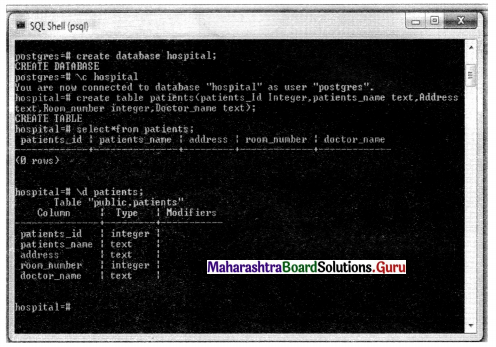
SOP 1: Create a database, using Postgres SQL named hospital.

  • In this database, create a table of patients with the following fields
    Patient_ID, Patients_Name, Address, Room_number and Doctor’s_name.
  • Give appropriate data type for each field.
    Maharashtra Board Class 11 Information Technology Practicals Skill Set 6 DBMS (PostgreSQL) SOP 1

Answer:
Step 1: Open Command Terminal. Switch over to the Postgres account on your server by typing.
$ sudo -i -u Postgres

Step 2: You can now access a Postgres prompt immediately by typing.
$ psql

Step 3: To create a database hospital;
create database hospital;

Step 4: Connect to Database using \c
\c hospital;

Maharashtra Board Class 11 Information Technology Practicals Skill Set 6 DBMS (PostgreSQL)

Step 5: Create a table in the database. Create Table Command is used.
create table patients(patients_Id Integer,patients_name text,Address text,Room_number integer,Doctor_name text);

Step 6: Let’s see the result of the patient’s table.
select * from patients;
or
\d patients;

Maharashtra Board Class 11 Information Technology Practicals Skill Set 6 DBMS (PostgreSQL) SOP 1.1

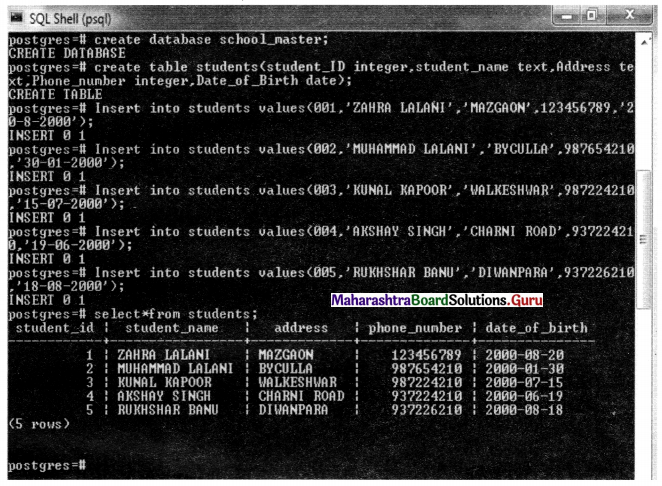
SOP 2: Create a database using PostgreSQL named Schoolmaster.

  • In this database create a table of students with the following fields
    student_ID, student_name, Address, Phone_number, Date_of_Birth.
  • Give appropriate data types for each field. Enter at least 5 records.

Answer:
Step 1: Create a database School-Master.
create database school_master;

Step 2: Now To connect the database use \c Command.
\c database school_master;

Step 3: Create a table of students with the following fields.Give appropriate data type for each Field.
student_ID, student_name, Address. Phone_number, Date_of_Birth.
create table students(student_ID integer, student_name text,Address_text,Phone_number integer,Date_of_Birth date);

Step 4: Enter at least 5 records.
Insert into students values(001,’ZAHRA LALANIVMAZGAON’,123456789,’20-08-2000’);
Insert into students values(002,’MUHAMMAD LALANI’/BYCULLA’, 987654210,’30-01-2000’);
Insert into students values(003,’KUNAL KAPOOR’,’WALKESHWAR’, 987224210,T5-7-2000’);
Insert into students values(004,’AKSHAY SINGH’,’CHARNI ROAD’. 937224210,’19-6-2000’);
Insert into students values(005,’RUKHSHAR BANU ’,’DIWANPARA’, 937226210,’18-8-2000’);

Step 5: Show all records using select command
seleet*from students:

Maharashtra Board Class 11 Information Technology Practicals Skill Set 6 DBMS (PostgreSQL) SOP 2

SOP 3: Given the list of fields: Empld, EmpName, EmpDepartment, Salaryld, Salary Amount, Bonus in the tables Employee and Salary respectively. Define primary key, foreign key and segregate for above fields into employee and salary table. Also create a one-to-one relationship between Employee and Salary Table.
Answer:
Step 1: Create a school database
Create database school;

Step 2: connect to database \c databasename;
\c school;

Maharashtra Board Class 11 Information Technology Practicals Skill Set 6 DBMS (PostgreSQL)

Step 3: In this database create two tables Employee and Salary with the following fields. Define primary key, foreign key and segregate for above fields into employee and salary table. Empld, EmpName, EmpDepartment, Salaryld, SalaryAmount, Bonus.
Create table salary(salaryld Integer PRIMARY KEY,Salaryamount integer,Bonus integer);
Create table employeefEmpId integer PRIMARY KEY,EmpName text,EmpDept text,Salaryld integer,FOREIGN KEY(salary ID)”REFERENCES Salaryfsalary id));

Step 4: See both tables
select*from salary;
select*from employee;

Maharashtra Board Class 11 Information Technology Practicals Skill Set 6 DBMS (PostgreSQL) SOP 3

Information Technology 11th Std Skill Oriented Practicals (SOP)

11th Information Technology Practicals Skill Set 5 Exercise Digital Content Creation (GIMP, Inkscape) Practical Problems Solutions Maharashtra Board
Digital Content Creation (GIMP, Inkscape) 11th Information Technology Practicals Skill Set 5 Solutions Maharashtra Board

Balbharati Maharashtra State Board Class 11 Information Technology Solutions Practicals Skill Set 5 Digital Content Creation (GIMP, Inkscape) Textbook Exercise Questions and Answers.

Class 11 Information Technology Practicals Skill Set 5 Exercise Solutions

SOP 1: Use of Toolbox and editing an image using GIMP.

  • Create an image by using Toolbox controls from GIMP.
  • Insert the image in an already created image.

Answer:
Step 1: Click GIMP Image Editor

Step 2: Create a blank New image
File → New (Ctrl + N)

Step 3: Change the foreground and background colour uses the Blend Tool.

Step 4: We will create a kid’s cap using toolbox controls.

Step 5: Draw colour oval (Ellipse). Change the background colour and foreground colours with three different Ellipse(oval) . Create a layer for each and every Ellipse.

Step 6: To add text, you’ll need to access your “Text Tool”. You can find your Text Tool in your Toolbox window.

Step 7: To make this image visible to people larger, select your “Scale Tool” from your Toolbox window.

Step 8: To save your image select Export as, select proper type, and click on export.

Step 9: Insert the image in an already created image.
Click on File → Open → Image → As Layer.
Move the image to the desired location and merge to the original image.

Maharashtra Board Class 11 Information Technology Practicals Skill Set 5 Digital Content Creation (GIMP, Inkscape)

SOP 2: Use GIMP for the following.

  • Create a new image
  • Put your name using the text tool.
  • Use various filters to make a logo of your name.
  • Auto crop image to text size.

Answer:
Use of Toolbox and editing an image using GIMP.
Create an image by using Toolbox controls from GIMP.

Step 1: click on the GIMP image Editor icon

Step 2: Create blank image File → Text document (Ctrl+N)

Step 3: Creates balloon image having very attractive colours using toolbox controls.

Step 4: Now change the foreground and background colour using the Blend tool (shot cut L). Drag the mouse from left to right on your canvas after release the mouse canvas will be filled by the gradient of foreground and background colour.

Step 5: Next click on the Text Tool (Short cut T)

Step 6: Using the Move tool, we can move the text roughly to the center of the image but instead we prefer to put it precisely in the center using the Align tool. Click on align tool (Short cut Q) and then select the text Layer and text.

Step 7: Drawing coloured oval (Ellipse). Change the background and foreground colours again with two different colours. We have to choose red and yellow colour respectively.

Step 8: Using the move tool place these ovals near the text. Select the layers one by one and merge them.
Layer → Merge Down. Now we have colourful single layer. Let us create a ballon from the canvas.

Step 9: Do Filters → Map → Map Object. Check ‘Update preview live’ and uncheck the ‘Transparent Background’.

Step 10: We will tweak the balloon further and give it a more realistic shape. Apply the Distort Filter with curve Bend option, i.e, Filter → Distort → Curve Bend. In the resulting dialog choose automatic preview and Lower curve border. Then drag the Mid Point of the Curve Indicator line using the mouse.

SOP 3: Use Inkscape for the following.

  • Draw a simple landscape using basic geometric shapes.
  • Use gradient tool for the same.

Answer:
Step 1: Select the tool button from the left toolbar showing the circle icon.

Step 2: Drag it with the mouse to any place in the client area. You will get an ellipse. To get the exact shape, press the CTRL key while dragging.

Step 3: After the ellipse is complete choose the selection tool from the left toolbar, then click on the ellipse, it will show 8 size handles. You can resize it by dragging those handles.

Step 4: To fill the ellipse with color, just click on any color given in the bottom color palette. Also, you can click on Menu object → Fill and stroke. It will give RGB color options, you can use any combinations from it.

Maharashtra Board Class 11 Information Technology Practicals Skill Set 5 Digital Content Creation (GIMP, Inkscape)

SOP 4: Use Inkscape for the following.

  • Load an Id size image,
  • Make 12 copies of it.
  • Arrange in 4 rows × 3 columns on an A4 size page.

Answer:
Step 1: Open Inkscape Vector Graphics Editor.

Step 2: File → New (Ctrl +N). Now Click on Document properties and select paper size A4.

Step 3: Import a bitmap or Svg Image into this document (Ctrl+l)

Step 4: Create 12 copies of it (4 rows and 3 columns) Create duplicate (Ctrl + D) images and set them in the proper grid.

Step 5. Arrange in 4 rows and 3 columns on an A4 size page.

SOP 5: Use Inkscape for the following.

  • You are starting a new business.
  • Create an advertisement to be published in a local newspaper promoting your product or services.
  • Size should be 210 × 210 mm.
  • Create your own visiting card using Inkscape.

Answer:
Steps to create advertisement:

Step 1: Choose a distinctive font and type some articles.

Step 2: Resize the text and press the long CTRL key to preserve the aspect ratio.

Step 3: Then outset it (Path → Outset)

Step 4: Change the color and resize down to the size.

Step 5: Now duplicate the text for the border.

Step 6: Color the duplicate temporarily in any random, non-white color (we need to see it over the white background) and move it under the initial text.

Step 7: Apply the outset effect (no need to resize this time, we are working on a rough border) and make it white.

Step 8: Duplicate the white border and make the duplicate black.

Step 9: Move the black duplicate at the bottom of the stack and shift it one or two pixels down and to the left for a drop shadow effect.

Step 10: Open the “Fill and Stroke” dialog and add a bit of Gaussian Blur and decrease the opacity.

Step 11: Post your finished work.

Steps to Create Visiting Card:

Step 1: To create a new empty document, use File → New → Default or press Ctrl+N.
To use File → New → Templates… or press Ctrl+Alt+N

Step 2: To click on document properties (Shift+Ctrl=D) and select Business card paper size.

Step 3: Click on the text menu and select Align and Distribute to align the card.

Step 4: Use the snap to the page border tool and Drag the Rectangles on the card.

Step 5: Specify the Height and width in inches. Width=3.75 Height=2.25

Step 6: Select the rectangle → Open Fill and stroke Toolbar → select linear gradient tool to show a border. Align the content.

Step 7: Set the ruler position.

Step 8: Create Layers. Now Draw the Circle on the card and set the fill and stroke properties.

Step 9: Change the object colour and create a duplicate object (ctrl+D)

Step 10: Select both objects → to go to the path menu → select difference. Now Select the Second object → to create duplicated object → change the object colour.

Step 11: Select Second duplicate Object → path → select difference → select flip selected object.
Select Edit Text Object Control → Type your Name, your website, Email ID, Phone in one, and Insert Logo.

Maharashtra Board Class 11 Information Technology Practicals Skill Set 5 Digital Content Creation (GIMP, Inkscape)

SOP 6: Using Inkscape make the following picture.
Maharashtra Board Class 11 Information Technology Practicals Skill Set 5 Digital Content Creation (GIMP, Inkscape) SOP 6
Answer:
Step 1: Open Inkscape Vector Graphics Editor File → New

Step 2: Select Circles, Ellipses to create circles.

Step 3: Change the colours of the object. Use Draw freehand line tool.

Step 4: For the middle body, again click on the ellipse, select white color and click and drag on the place you want.

Step 5: For Head again choose ellipse tool ALT + CTRL to create a perfect circle, resize it and drag it on the proper place.

Step 6: For eyes, zoom in and choose the circle tool, select the proper color, press ALT+CTRL to resize it, and choose another circle, set black color, and draw a circle inside it.

Step 7: Press CTRL+D to make a duplicate and place it on another side.

Step 8: Create Hands. Create duplicate images → path → differences.

Step 9: Create legs using star tools → merge all starts → path → union.

Information Technology 11th Std Skill Oriented Practicals (SOP)

11th Information Technology Practicals Skill Set 4 Exercise Accounting Package (GNUKhata) Practical Problems Solutions Maharashtra Board
Accounting Package (GNUKhata) 11th Information Technology Practicals Skill Set 4 Solutions Maharashtra Board

Balbharati Maharashtra State Board Class 11 Information Technology Solutions Practicals Skill Set 4 Accounting Package (GNUKhata) Textbook Exercise Questions and Answers.

Class 11 Information Technology Practicals Skill Set 4 Exercise Solutions

SOP 1: Use of Accounting Package to create a company.
Create a company with the following particulars.
Company Name: B.B Enterprises
Case: Upper Case
Company Type: Profit Making
Financial Year: 01-04-2019 to 31-03-2020
Use GNUKhata for: Accounting Only
Create a profile with relevant data for any company. Create an Admin account for the company.
Answer:
Step 1: Open GNUKhata Application. Click on ‘company Setup Wizard’ or (press shift + control + C)

Step 2: While creating a company the following details are to be given.
Company Name: B.B Enterprises
Case: Upper Case
Company Type: Profit Making
Financial Year: 01/04/2019 to 31/03/2020
Use GNUKhata for: Accounting Only
Fill in all the required details and click on proceed button on the right button corner.

Step 3: Enter Appropriate Company Information in the Given Field.
Company Profile window appears, in that window fill in the details and click on proceed button on the right bottom corner.

Step 4: Create Admin Next step is the ‘create Admin’ which is mandatory with proper user name and password. Fill in the fields and click on ‘Create & Login button, the company will be created.
Now your Company is ready.

Step 5: Admin Dashboard After login, the following admin dashboard, appears.

Maharashtra Board Class 11 Information Technology Practicals Skill Set 4 Accounting Package (GNUKhata)

SOP 2: Create ledger accounts using the accounting Package.
Create ledger accounts for the following and allocate proper groups.

  1. Import duty
  2. Insurance
  3. Machinery
  4. Audit Fee
  5. Purchase
  6. Sales
  7. Telephone charges
  8. Interest Received
  9. Salary
  10. Professional fees

Answer:
Step 1: You Can select an already created company using the ‘Select Existing Company ’ Option on Opening Screen.

Step 2: Log in with User Name and Password

Step 3: To create an account (ledger account) click on the Hamburger Menu available at the left top corner of the dashboard.
Click on the Master Account → It allows you to create an account.
The following table shows the group name, sub-group name, and account name which are to be created.

Group Name Sub Group Name Account / Ledger Name
Direct Expenses None Import Duty
Indirect Expenses None Insurance
Fixed Assets Plant & Machinery Machinery
Indirect Expenses None Audit fee
Direct Expense None Purchase
Direct Income None Sales
Indirect Expense None Telephone charges
Indirect Income None Interest received
Indirect Expense None Salary
Direct Income None Professional Fees

Information Technology 11th Std Skill Oriented Practicals (SOP)

11th Information Technology Practicals Skill Set 3 Exercise Client Side Scripting (JavaScript) Practical Problems Solutions Maharashtra Board
Client Side Scripting (JavaScript) 11th Information Technology Practicals Skill Set 3 Solutions Maharashtra Board

Balbharati Maharashtra State Board Class 11 Information Technology Solutions Practicals Skill Set 3 Client Side Scripting (JavaScript) Textbook Exercise Questions and Answers.

Class 11 Information Technology Practicals Skill Set 3 Exercise Solutions

SOP 1: Create a JavaScript program for the following using appropriate variables, JavaScript inbuilt functions, and control structures.

  • To accept an integer and display the result by multiplying it with 3.
  • To accept two integers and display a larger number of them.
  • To check whether the user entered number is positive or negative.

Answer:
To accept integer and display the result by multiplying it with 3.
<!DOCTYPE html>
<head>
<title>To accept integer and display the result by multiplying it with 3.</title>
</head>
<body>
<script language=”javascript”> var a,no,ans;
a=prompt(Enter any value’);
no=parseInt(a);
ans=no*3;
document.
write(“The answer is :”+ans);
</script>
</body>
</html>

Maharashtra Board Class 11 Information Technology Practicals Skill Set 3 Client Side Scripting (JavaScript) SOP 1

Maharashtra Board Class 11 Information Technology Practicals Skill Set 3 Client Side Scripting (JavaScript) SOP 1.1

Maharashtra Board Class 11 Information Technology Practicals Skill Set 3 Client Side Scripting (JavaScript)

To accept two integers and display larger number of them.
<!DOCTYPE html>
<head>
<title>To accept two integers and display larger number of them.</title>
</head>
<body>
<script language=”javascript”>
var a,b;
a=prompt(‘Enter first value’);
b=prompt(‘Enter second value’);
if(a>b)
document.write(“a is large number than b “);
else
document. write(“b is large number than a”);
</script>
</body>
</html>

Maharashtra Board Class 11 Information Technology Practicals Skill Set 3 Client Side Scripting (JavaScript) SOP 1.2

Maharashtra Board Class 11 Information Technology Practicals Skill Set 3 Client Side Scripting (JavaScript) SOP 1.3

To check whether, user entered number is positive or negative.
<!DOCTYPE html>
<head>
<title>To check whether, user entered number is positive or negative</title>
</head>
<body>
<script language=”javascript”>
var a,no;
a=prompt(‘Enter any number’);
no=parseInt(a);
if(no>0)
document.write(“Number is Positive”);
else
document.write(“Number is Negative”);
</script>
</body>
</html>

Maharashtra Board Class 11 Information Technology Practicals Skill Set 3 Client Side Scripting (JavaScript) SOP 1.4

Maharashtra Board Class 11 Information Technology Practicals Skill Set 3 Client Side Scripting (JavaScript) SOP 1.5

Maharashtra Board Class 11 Information Technology Practicals Skill Set 3 Client Side Scripting (JavaScript) SOP 1.6

SOP 2: Create a JavaScript program for the following using appropriate variables, JavaScript inbuilt functions, and control structures.

  • To accept two positive or negative numbers and check whether they are equal or not.
  • To accept a number and display the square of it.
  • To check whether the accepted integer is multiple of 3 or multiple of 7.

Answer:
To accept two positive or negative numbers and check whether they are equal or not.
<!DOCTYPE html>
<head>
<title>program3</title>
</head>
<body>
<script language=”javascript”> var no1,no2;
no1=prompt(‘Enter first number’);
no2=prompt(‘Enter Second number’);
if(no1==no2)
document.write(“Both are equal”);
else
document.write(“Given numbers are not equal”);
</script>
</body>
</html>

Maharashtra Board Class 11 Information Technology Practicals Skill Set 3 Client Side Scripting (JavaScript)

Maharashtra Board Class 11 Information Technology Practicals Skill Set 3 Client Side Scripting (JavaScript) SOP 2

Maharashtra Board Class 11 Information Technology Practicals Skill Set 3 Client Side Scripting (JavaScript) SOP 2.1

To accept number and display square of it.
<!DOCTYPE html>
<head>
<title>To accept number and display square of it</title>
</head>
<body>
<script language-’j avascript”>
var no,sqr;
no=prompt(‘Enter Any number’);
sqr=no*no;
document, write (“The Square is=”+sqr);
</script>
</body>
</html>

Maharashtra Board Class 11 Information Technology Practicals Skill Set 3 Client Side Scripting (JavaScript) SOP 2.2

To check whether the accepted integer is multiple of 3 or multiple of 7.
<!DOCTYPE html>
<html>
<head>
<title>To check whether the accepted integer is multiple of 3 or multiple of 7.</title>
</head>
<body>
<script language=JavaScript>
var a;
a=prompt(“Enter your first interger / number”);
if(a%3==0 | | a%7==0)
alert(“multiple of 3 or 7”);
else
alert(“not a multiple of 3 or 7”);
</script>
</body>
</html>

Maharashtra Board Class 11 Information Technology Practicals Skill Set 3 Client Side Scripting (JavaScript) SOP 2.3

SOP 3: Create a JavaScript program for the following using appropriate variables, JavaScript inbuilt string functions, and control structures.

  • To accept a string and calculate its length.
  • To accept a string and display it in lowercase and uppercase.
  • To check whether the length of the string is 4 or greater.

Answer:
To accept a string and calculate its length.
<!DOCTYPE html>
<head>
<title>program8</title>
</head>
<body>
<script language=”javascript”>
var a;
a=prompt(‘Enter string’);
document.write(“The length is=”+a.length);
</script>
</body>
</html>

Maharashtra Board Class 11 Information Technology Practicals Skill Set 3 Client Side Scripting (JavaScript)

Maharashtra Board Class 11 Information Technology Practicals Skill Set 3 Client Side Scripting (JavaScript) SOP 3

Maharashtra Board Class 11 Information Technology Practicals Skill Set 3 Client Side Scripting (JavaScript) SOP 3.1

To accept string and display it into lowercase and uppercase.
<!DOCTYPE html>
<head>
<title> To accept string and display it into lowercase and uppercase</title>
</head>
<body>
<script language=”javascript”>
var a;
a=prompt(‘Enter any string’);
document.write(“<br>Entering Strings “+a);
document.write(“<br>Lowercase=”+a.toLowerCase());
document.writeln(“<br>Uppercase=”+a.toUpperCase());
</script>
</body>
</html>

Maharashtra Board Class 11 Information Technology Practicals Skill Set 3 Client Side Scripting (JavaScript) SOP 3.2
To check whether the length of string is 4 or greater.
<!DOCTYPE html>
<html>
<head>
<title> JavaScript</title>
</head>
<body>
<script language=JavaScript>
var a,b;
a=prompt(“Enter your text”);
b=a.length;
if(b=4 || b>=4)
alert(‘‘your length is 4 or greater”);
else
alert(“your text length is below 4”);
</script>
</body>
</html>

Maharashtra Board Class 11 Information Technology Practicals Skill Set 3 Client Side Scripting (JavaScript) SOP 3.3

Maharashtra Board Class 11 Information Technology Practicals Skill Set 3 Client Side Scripting (JavaScript) SOP 3.4

Maharashtra Board Class 11 Information Technology Practicals Skill Set 3 Client Side Scripting (JavaScript)

SOP 4: Create event-driven JavaScript programs for the following using appropriate variables, JavaScript inbuilt functions, and control structures.
To accept numbers and validate if the given value is a number or not by clicking on the button.
Maharashtra Board Class 11 Information Technology Practicals Skill Set 3 Client Side Scripting (JavaScript) SOP 4.4
To calculate the addition and division of two numbers.
Maharashtra Board Class 11 Information Technology Practicals Skill Set 3 Client Side Scripting (JavaScript) SOP 4.5
Answer:
To accept number and validate if the given value is a number or not by click
<!DOCTYPE html>
<html>
<head>
<title> To accept number and validate if the given value is a number or not by clicking on the button.
</title>
</head>
<script language-’JavaScript”>
function display()
{
var a,b;
a=form1.t1;value;
if(a>=0)
alert(“Value is a number”+” “+a);
else
alert(“Value is a string”+” “+a);
}
</script>
</head>
</body>
<form name=form1>
Enter Value: <Input type=text name=t1><br><br>
<Input type=button value=Check onClick=”display()”>
</form>
</body>
</html>

Maharashtra Board Class 11 Information Technology Practicals Skill Set 3 Client Side Scripting (JavaScript) SOP 4

Maharashtra Board Class 11 Information Technology Practicals Skill Set 3 Client Side Scripting (JavaScript) SOP 4.1

Maharashtra Board Class 11 Information Technology Practicals Skill Set 3 Client Side Scripting (JavaScript) SOP 4.2

Maharashtra Board Class 11 Information Technology Practicals Skill Set 3 Client Side Scripting (JavaScript)

To calculate addition and division of two numbers.
<!DOCTYPE html>
<head>
<title>To calculate addition and division of two numbers.</title>
<script langauge=”javascript”>
function add()
{
var a,b,result;
a=f1.t1.value;
b=f1.t2.value;
result=parselnt(a)+parselnt(b);
document.write(“The Addition is =”+result);
}
function div()
{
var a,b,d;
a=f1.t1.value;
b=f1.t2.value;
d=parselnt(a)/parselnt(b);
document.write(“The Divide is =”+d);
}
</script>
</head>
<body>
<form name=”f1”>
1st Number : <input type=”text” name=”t1”><br>
2nd Number : <input type=”text” name=”t2”><br>
<input type=”button” value=”Addition” name=”b1” onClick=”add()”>
<input type=”button” value=”Division” name=”b2” onClick=”div()”>
</form>
</body>
</html>

Maharashtra Board Class 11 Information Technology Practicals Skill Set 3 Client Side Scripting (JavaScript) SOP 4.3

Information Technology 11th Std Skill Oriented Practicals (SOP)

11th Information Technology Practicals Skill Set 2 Exercise Web Designing (HTML – 5) Practical Problems Solutions Maharashtra Board
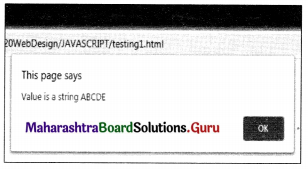
Web Designing (HTML – 5) 11th Information Technology Practicals Skill Set 2 Solutions Maharashtra Board

Balbharati Maharashtra State Board Class 11 Information Technology Solutions Practicals Skill Set 2 Web Designing (HTML – 5) Textbook Exercise Questions and Answers.

Class 11 Information Technology Practicals Skill Set 2 Exercise Solutions

SOP 1: Write a program using HTML with the following specifications.

  • The background colour should be green.
  • The text colour should be red.
  • The heading should be as large in size as ‘My First Web Page’.
  • Display a horizontal line after the heading.
  • Display your name in Bold, address in Italics, and standard as 11th.

Answer:
<!DOCTYPE html>
<html>
<head>
<title>sop1</title>
</head>
<body bgcolor=green text= red>
<h1> My First Web Page </h1>
<hr>
<b> Reliable Publications</b>
<br>
<i> Chira bazar,Charni road,Mumbai</i>
<br>
Standard 11th.
</body>
</html>

Maharashtra Board Class 11 Information Technology Practicals Skill Set 2 Web Designing (HTML - 5) SOP 1

Maharashtra Board Class 11 Information Technology Practicals Skill Set 2 Web Designing (HTML - 5)

SOP 2: Create a web page with, following specifications.

  • Image of any scientist with an alternate text as his name.
  • Create a paragraph related to the information of that scientist.
  • Create a table of his/her inventions.

Answer:
<!DOCTYPE html>
<html>
<head>
<title>sop2</title>
</head>
<body>
<img src=”Albert Einstein.jpg” alt=”Albert Einstein”>
<br>
<p>
Albert Einstein was a German-born theoretical physicist who developed the theory of relativity,<br> one of the two pillars of modern physics.His work is also known for its influence on the philosophy of science.
</p>
<table border=5 bordercolor=pink>
<tr>
<th> Sr no.</th>
<th> Invention </th>
<th> Year</th>
</tr>
<tr>
<td>1</td>
<td>Quantum Theory of Light </td>
<td>1905</td>
</tr>
<tr>
<td>2</td>
<td>Theory of Relativity</td>
<td>1907</td>
</tr>
</table>
</body>
</html>

Maharashtra Board Class 11 Information Technology Practicals Skill Set 2 Web Designing (HTML - 5) SOP 2

SOP 3: Create a webpage with the following specifications.

  • Display heading ‘Application Form’ in the highest heading with center alignment.
  • Accept name, standard 11th or 12th with only one selection choice.
  • Submit the form.

Answer:
<! DOCTYPE html>
<html>
<head> <title> sop3</title>
</head>
<body>
<h1 align=center> Application Form </h1>
<form>
Enter Name:<input type=text name=t1>
<br><br>
Standard:<br>
<input type=”radio” name=r1>11th<br>
<input type=”radio” name=r1>12th<br>
<br><br>
<input type=”submit” value=”Submit”>
</form>
</body>
</html>

Maharashtra Board Class 11 Information Technology Practicals Skill Set 2 Web Designing (HTML - 5) SOP 3

Maharashtra Board Class 11 Information Technology Practicals Skill Set 2 Web Designing (HTML - 5)

SOP 4: Write a program using HTML with the following specification.
A webpage with details about a class with a total number of students-100, (Boys – 50), Girls – 50 in tabular form.
e.g.
Maharashtra Board Class 11 Information Technology Practicals Skill Set 2 Web Designing (HTML - 5) SOP 4
Link this page to another page as follows.
Maharashtra Board Class 11 Information Technology Practicals Skill Set 2 Web Designing (HTML - 5) SOP 4.1
Demo.html
Answer:
<!DOCTYPE html>
<html>
<head>
<title>New Page 1</title>
</head>
<body>
<center>
<table border=”1” width=”69%” >
<tr bgcolor=pink>
<td>Number of Students</td>
<td>Boy</td>
<td>Girls</td>
</tr>
<tr bgcolor=”lightgreen”>
<td>100</td>
<td>50</td>
<td>50</td>
</tr>
</table>
</body>
</html>

Maharashtra Board Class 11 Information Technology Practicals Skill Set 2 Web Designing (HTML - 5) SOP 4.2

Demo
<!DOCTYPE html>
<html>
<head>
<title>the heading</title>
</head>
<BODY>
<header>
<center>
<table border=”1” align=center>
<tr align=center>
<td><a href=”sop4.html”>STD – XI</a>
<br>Stream – Science<br>
Div – A<br></td>
</tr>
</table>
</body>
</html>

Maharashtra Board Class 11 Information Technology Practicals Skill Set 2 Web Designing (HTML - 5) SOP 4.3

Information Technology 11th Std Skill Oriented Practicals (SOP)

11th Information Technology Practicals Skill Set 1 Exercise Daily Computing (Libre Office) Practical Problems Solutions Maharashtra Board
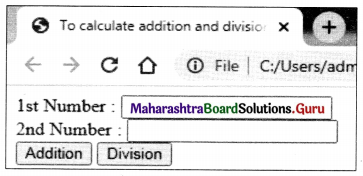
Daily Computing (Libre Office) 11th Information Technology Practicals Skill Set 1 Solutions Maharashtra Board

Balbharati Maharashtra State Board Class 11 Information Technology Solutions Practicals Skill Set 1 Daily Computing (Libre Office) Textbook Exercise Questions and Answers.

Class 11 Information Technology Practicals Skill Set 1 Exercise Solutions

SOP 1: Create a Resume

  • The resume should contain the following:
  • Title at the center with applicable font and size.
  • It should contain points such as Name, Address, Mobile Number, Date of Birth, Nationality, Caste, Category, Hobbies, etc. Add some extra points.
  • For educational qualifications, a student should insert a table.
  • In the end, students should write a few lines about their aim.

Answer:
Step 1: Click on the LibreOffice Writer icon.

Step 2: Create a New File.
File Menu → New → Text Document

Step 3: Write Title at the center with applicable font size. (Resume).

Step 4: Type Name, Address, Mobile Number, Date of Birth, Nationality, Caste, Category, Hobbies, etc.

Step 5: Write Student educational qualifications (Insert Table).
Choose Table Menu → Insert Table → Select number of rows and columns → Insert.

Step 6: Write some lines about the aim, select the text and make it bold by clicking on the bold option from the formatting toolbar.

After Completing this practical students will learn how to create resumes using LibreOffice, also tab setting and table creation.

Maharashtra Board Class 11 Information Technology Practicals Skill Set 1 Daily Computing (Libre Office)

SOP 2: By using Mail Merge send an invitation for your birthday party.

  • Use the mail merge feature.
  • Send an invitation to at least 5 friends.

Answer:
Choose Tools – Mail Merge Wizard.
Step 1: Select Start from a template, and click the Browse button. You see the New dialog.

Step 2: Select five friends Details in the left list, and then the Invitation letter in the right list.
Click OK to close the Templates dialog, and click Next in the wizard.

Step 3: Select Letter and click Next.

Step 4: On the next step of the wizard, click the Select Address List button to check that you are using the correct address list. If you want to use an address block, select an address block type, match the data fields if necessary, and click Next.

Step 5: Next follows the Create a salutation step. Deselect the Insert personalized salutation box. Under General salutation, select the salutation that you want on top of all letters.

Step 6: If you want to place mail merge fields anywhere else in the Invitation document select the corresponding column in your address data source and then drag and drop the column header into the invitation document where you would like the field to be. Be sure to select the entire column.

Step 7: Click Next and finally Finish creating the mail merge.

SOP 3: Create a mark list. The mark list should display:

  • Fields as Name, Math, Physics, Chemistry, Biology, Total, Percentage.
  • Below each subject find out the lowest marks and highest marks.
  • Enter a minimum of 10 records.
  • Declare the first three ranker students.
  • Create a chart based on the above data.

Answer:
Step 1: Open LibreOffice Calc and add fields like Name, Math, Physics, Chemistry, Biology, Total, Percentage.

Step 2: Enter 10 records in it.

Step 3: To Calculate Total
Click inside the cell where the total has to be calculated.
(Use =SUM(A2:D2) formula) – Type the range of cell.

Step 4: Now click inside the cell where the percentage has to be calculated.
Calculate Percentage using formula = E2* 100/400, drag the formula for remaining cells.

Step 5: Enter a minimum of 10 records. And calculate the result.

Step 6: Find out the Lowest Marks
Calculate Lowest marks using formula = min(A2:A11), drag formula for remaining cells.

Step 7: Find out the Highest Marks
Calculate Highest marks using formula =max(A2:A11), drag formula for remaining cells.

Step 8: Now Show the first three ranker students. Use Sort Option for sorting and auto filter.

Step 9: To find the first ranker use formula =large(F2:F11,1)

Step 10: To find the second ranker use formula =large(F2:F11,2)

Step 11: To find the third ranker use formula =large(F2:F11,3)

Step 12: To create a chart Select Complete Table → Click on Insert Menu → Click on Chart Option.
A window will appear, which starts with the chart wizard → Select Chart type.

Maharashtra Board Class 11 Information Technology Practicals Skill Set 1 Daily Computing (Libre Office)

SOP 4: Create an Informative presentation on your college.

  • The presentation should contain a minimum of 8 slides.
  • One slide should contain a chart.
  • One slide with an image.
  • Each slide should contain custom animation & slide transition effect.

Answer:
Step 1: Preparing an Eight slide for an Informative presentation of your college.
Press the Ctrl + N Keys. OR choose Slide → New Slide from Menu bar.
OR
Click on the New Slide icon on the Standard Toolbar.

Step 2: Specify the background image. OR background colour.
Now First Choose Slide Menu → Click on Insert Menu → Click on Image Submenu (inserting college Image with information )

Step 3: Click on Insert Menu → Click on Chart Option.

Step 4: Click on object presentation → from slide bar select Custom Animation each object → Choose category, effect, duration, direction, etc.

Step 5: Click on Press F5 function key for slide show
OR
Select slide menu → Start from the first Slide from the menu bar.
OR
Click on the start from the first slide Icon on the standard Conclusion: After Completing this practical students will be known how to create an informative presentation, custom animation & slide transition effect using Libre Office Impress.

Information Technology 11th Std Skill Oriented Practicals (SOP)

11th Information Technology Chapter 4 Exercise Cyber Law Practical Problems Solutions Maharashtra Board
Cyber Law 11th Information Technology Chapter 4 Solutions Maharashtra Board

Balbharati Maharashtra State Board Class 11 Information Technology Solutions Chapter 4 Cyber Law Textbook Exercise Questions and Answers.

Class 11 Information Technology Chapter 4 Exercise Solutions

1. Complete the following web.

Question 1.
Maharashtra Board Class 11 Information Technology Solutions Chapter 4 Cyber Law 1 Q1
Answer:

  1. Use the Internet for the knowledge base.
  2. Use the Internet to communicate messages.
  3. Respect the privacy of other users on the Internet.
  4. Download legitimate and authentic programs from the Internet.
  5. Use licensed software on your computer.
  6. Check to see if the web address begins with https:// whenever you sign in.
  7. Report and flag content that is abusive or illegal.

Maharashtra Board Class 11 Information Technology Solutions Chapter 4 Cyber Law

2. Complete the following chart.

Question 1.
Maharashtra Board Class 11 Information Technology Solutions Chapter 4 Cyber Law 2 Q1
Answer:
Maharashtra Board Class 11 Information Technology Solutions Chapter 4 Cyber Law 2 Q1.1

3. Fill the following boxes with the appropriate cybercrime name.

Question 1.
Copyright violation of software created originally by an individual.
Maharashtra Board Class 11 Information Technology Solutions Chapter 4 Cyber Law 3 Q1
Answer:
Software Piracy

Question 2.
Gaining access without the user’s permission.
Maharashtra Board Class 11 Information Technology Solutions Chapter 4 Cyber Law 3 Q2
Answer:
Unauthorized Access

Maharashtra Board Class 11 Information Technology Solutions Chapter 4 Cyber Law

Question 3.
Extracting confidential information by email.
Maharashtra Board Class 11 Information Technology Solutions Chapter 4 Cyber Law 3 Q3
Answer:
Phishing

4. Read the following and answer the question.

Rahul lost his pen drive in his college computer lab. His classmate Madhav finds it. He carries it home to return it to him the next day. When Madhav opens it he finds his favourite game. He thinks of making a duplicate copy of the game software.

Question I.
Does Madhav think ethically?
Answer:
No

Question II.
What do you think should Madhav do?
Answer:
Madhav should return back the pen drive. He has done unauthorized access.

Question III.
If he makes a duplicate copy then which cybercrime will he commit?
Answer:
Software Piracy

5. Answer in brief.

Question 1.
What care should be taken by the user while doing online activities?
Answer:

  1. Stick to copyright restrictions when downloading anything from the internet.
  2. Use strong passwords with combinations of numbers. Uppercase and lowercase letters and special characters.
  3. Always scan files before opening them.
  4. Don’t talk to strangers.
  5. Think before posting something on social media related to any sensitive topic like politics, religion, etc.
  6. Report to the service provider if the account is hacked; if possible deactivate your account.
  7. Whenever you sign in online check if the web address begins with https: //

Question 2.
Define the terms (1) Ethics (2) Moral
Answer:
Ethics:
Ethics also called moral philosophy is the discipline concerned with what is morally good and bad, right or wrong.

Moral:
The standards of behaviour; principles of right and wrong behaviour. Thus morals are dictated by society, culture, or religion while ethics are chosen by the person himself which governs his life.

Maharashtra Board Class 11 Information Technology Solutions Chapter 4 Cyber Law

Question 3.
Explain three examples related to unauthorized access?
Answer:

  1. Hacking financial/bank account-related information.
  2. Stealing organizational/intellectual information.
  3. Illegal monitoring of information owned by other users.
  4. Illegal use/break of login and password of other users.
  5. Causing intentional irritation to other users by means of damaging software and important information.

Question 4.
Explain software piracy and Hacking.
Answer:
Software piracy:
Software piracy is the illegal copying, distribution, or use of the software. It 15 such a profitable “business” that it has caught the attention of organized crime groups in a number of countries. According to the Business Software Alliance (BSA), about 36% of all software in current use is stolen.

Hacking:
Hacking refers to unauthorized intrusion into a computer or a network. Hacker is a person intensely interested in the deep and hidden or concealed working of any computer operating system and programming language. They might discover loopholes within systems and reasons for such loopholes.

6. State true or false.

Question 1.
A firewall is used to encrypt the transmission of data.
Answer:
True

Question 2.
The standards of behaviour; the principle of right or wrong are referred to as moral.
Answer:
True

Maharashtra Board Class 11 Information Technology Solutions Chapter 4 Cyber Law

Question 3.
Hacking bank account-related information is an example of software piracy.
Answer:
False

Question 4.
Phishing is representing someone else’s work as own without permission.
Answer:
True

7. Match the following.

Question 1.

(A) (B)
(1) Copying a game file (a) Firewall
(2) Law related to internet (b) Cyberthreat
(3) Network security (c) Software piracy
(4) System crashes suddenly (d) Cyber Law

Answer:

(A) (B)
(1) Copying a game file (c) Software piracy
(2) Law related to internet (d) Cyber Law
(3) Network security (a) Firewall
(4) System crashes suddenly (b) Cyberthreat

8. Observe the following picture and give your opinion about it by responding to the following questions.

Maharashtra Board Class 11 Information Technology Solutions Chapter 4 Cyber Law 8 Q1

Question 1.
Is ‘B’s response correct or not?
Answer:
No B’s response is not correct.

Maharashtra Board Class 11 Information Technology Solutions Chapter 4 Cyber Law

Question 2.
What will be the consequences of ‘B’s reply?
Answer:
With all such crucial information like OTP in hand, the fraudster can easily carry out illegal financial transactions using B’s identity.

Question 3.
Which type of cybercrime does the picture depict?
Answer:
Fake Call Frauds

Information Technology 11th Std Commerce 

11th Information Technology Chapter 3 Exercise Impressive Web Designing Practical Problems Solutions Maharashtra Board
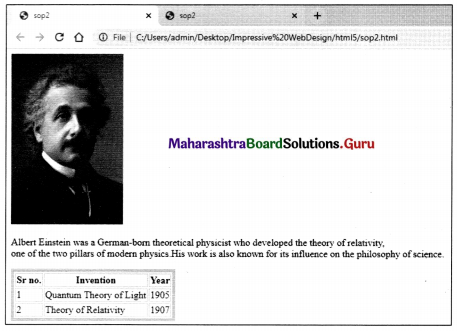

Impressive Web Designing 11th Information Technology Chapter 3 Solutions Maharashtra Board

Balbharati Maharashtra State Board Class 11 Information Technology Solutions Chapter 3 Impressive Web Designing Textbook Exercise Questions and Answers.

Class 11 Information Technology Chapter 3 Exercise Solutions

1. Answer the Following:

Question 1.
The data entry operator wants to insert.
1. Photograph
2. Write remarks about the photograph
3. Underline the heading.
He will use:
1. <Image>
2. <Text>
3. <TextArea>
4. <Img>
5. <UL>
6. <U>
Select the correct tags from the above and arrange them in the sequence.
Answer:
1. Photograph – <Img>
2. Write remarks about the photograph – <TextArea>
3. Underline the heading – <U>

Question 2.
Identify the logical operators in JavaScript.
1. OR
2. AND
3. ||
4. &
5. &&
6. ++
Answer:
| |, &&

Maharashtra Board Class 11 Information Technology Solutions Chapter 3 Impressive Web Designing

2. Complete the following Activity:

Question 1.
State at least three attributes of <Input>
Maharashtra Board Class 11 Information Technology Solutions Chapter 3 Impressive Web Designing 2 Q1
Answer:
Maharashtra Board Class 11 Information Technology Solutions Chapter 3 Impressive Web Designing 2 Q1.1

Question 2.
Maharashtra Board Class 11 Information Technology Solutions Chapter 3 Impressive Web Designing 2 Q2
Answer:
Maharashtra Board Class 11 Information Technology Solutions Chapter 3 Impressive Web Designing 2 Q2.1

Question 3.
Group the Following.
Maharashtra Board Class 11 Information Technology Solutions Chapter 3 Impressive Web Designing 2 Q3
Answer:
Maharashtra Board Class 11 Information Technology Solutions Chapter 3 Impressive Web Designing 2 Q3.1
Maharashtra Board Class 11 Information Technology Solutions Chapter 3 Impressive Web Designing 2 Q3.2

Maharashtra Board Class 11 Information Technology Solutions Chapter 3 Impressive Web Designing

Question 4.
Write operator names with symbols in boxes.
Maharashtra Board Class 11 Information Technology Solutions Chapter 3 Impressive Web Designing 2 Q4
Answer:
Maharashtra Board Class 11 Information Technology Solutions Chapter 3 Impressive Web Designing 2 Q4.1

Question 5.
Complete following program to display multiplication of 6.40 and 300.
<!DOCTYPE html>
<html>
<head><title> Series </title></head>
<body>
Maharashtra Board Class 11 Information Technology Solutions Chapter 3 Impressive Web Designing 2 Q5
</html>
Answer:
<!DOCTYPE html>
<html>
<head><title> Series </title></head>
<body>
Maharashtra Board Class 11 Information Technology Solutions Chapter 3 Impressive Web Designing 2 Q5.1
</html>

3. Find out errors if any in the following javascript code.

Question 1.
var length, breadth;
length=4.5;
breadth=6;
area=1/2*length*breadth;
document.write(“Area of triangle is”area);
Answer:
Concatenate Operator ‘+’ is missing
document. write(“Area of triangle is” [+] area);

Maharashtra Board Class 11 Information Technology Solutions Chapter 3 Impressive Web Designing

4. Solve the following puzzles.

Question A.
Fill the blocks
Maharashtra Board Class 11 Information Technology Solutions Chapter 3 Impressive Web Designing 4 Q1
1) Across
2. The tag is used to create a table row.
4. Tag to create a form

2) Down
1. The attribute is used to specify the path of a linked document.
3. The tag used to display horizontal ruled line
Answer:
Maharashtra Board Class 11 Information Technology Solutions Chapter 3 Impressive Web Designing 4 Q1.1
Across
2. <tr>
4. <form>
Down
1. href
3. <hr>

Question B.
Solve the puzzle by finding words with the help of the hint given below.
Maharashtra Board Class 11 Information Technology Solutions Chapter 3 Impressive Web Designing 4 Q2
1. Boolean value.
2. Keyword used in conditional if statement.
3. Built-In function in JavaScript
4. Function to check given value is number or not
5. Keyword used to declare a variable
6. Function used to evaluate given expression
Answer:
Maharashtra Board Class 11 Information Technology Solutions Chapter 3 Impressive Web Designing 4 Q2.1
1. False
2. if
3. confirm
4. nan
5. var
6. False

Maharashtra Board Class 11 Information Technology Solutions Chapter 3 Impressive Web Designing

5. Trace the output of the following Html code.

Question 1.
<!DOCTYPE html>
<html>
<head>
<title>Heading tags</title></head>
<body>
<h1 align=left>Information Technology</h1>
<hr>
<h2 align=center>XI Standard</h2>
<h3 align=right>Division</h3>
</body>
</html>
Answer:
Maharashtra Board Class 11 Information Technology Solutions Chapter 3 Impressive Web Designing 5 Q1

6. Discuss the following and answer the questions.

Question 1.
A Jr. web designer wants to design a webpage to enter the employee’s name, address. He needs a button to clear the form content and submit the data.
Write the different controls he will use to create the web page.
State the tags to be used for the controls.
Answer:
A Junior Web designer will use the following controls to design web as follows:
1. Text – to create a single-line textbox for employee name
2. Text or Textarea – If he wants to create a single-line address the text control is used otherwise to create a multiline address textarea is used.
3. Submit – It is used to submit form data to the server.
4. Reset – It is used to clear form data.

Tags used for the controls are-
1. Employee Name :<Input type-”text”>
2. Address :<Input type=”text”> or
Address: <textarea rows=”4” cols-”30”><textarea>
3. <Input type=”submit” value=”submit”>
4. <Input type-”reset” value=”reset”>

Maharashtra Board Class 11 Information Technology Solutions Chapter 3 Impressive Web Designing

Question 2.
A teacher has asked a student to create a web page to accept numbers and check whether it is between 50 to 100.
List the variable, operators to be used.
Specify the built-in function used and structure used.
Answer:
Program:
<!DOCTYPE html>
<head>
</head>
<body>
<script language =”Javascript”>
//To check whether the given no is between 50 to 100
var n;
n=prompt(“Enter any number”);
if(n<50 | | n>100)
{
alert(“it is less than 50, Please Re-Enter”);
}
else
{
alert(“it is greater than 50. Please Re-Enter”);
}
</script>
</body>
</html>

Variables used ‘n’
Operators used Not is equals | | less then < grater then > etc
Function is Prompt(), Alert() if then Else

7. Create web pages for the following.

Question 1.
Write a program using HTML to design your class Time Table.
Answer:
Program <!Doctype Html>
<html>
<head><title> Time Table of Class XI</title>
</head>
<body bgcolor=yellow>
<h2>Time Table of Class XI</h2>
<table border=”2” bgcolor=skyblue>
<tr>
<th>Period No</th>
<th>Monday</th>
<th>Tuesday</th>
<th>Wednesday</th>
<th>Thursday</th>
<th>Friday</th>
<th>Saturday</th>
</tr>
<tr>
<td>1</td>
<td>Book Keeping</td>
<td>Economics</td>
<td>Maths</td>
<td>Maths</td>
<td>English</td>
<td>English</td>
</tr>
<tr>
<td>2</td>
<td>Maths</td>
<td>Maths</td>
<td>Book Keeping</td>
<td>Economics</td>
<td>English</td>
<td>IT</td>
</tr>
<tr>
<td>3</td>
<td>Maths</td>
<td>Maths</td>
<td>Book Keeping</td>
<td>Economics</td>
<td>IT</td>
<td>IT</td>
</tr>
<tr>
<th colspan=”7”>”L U N C H_B R E A K”</th>
</tr>
<tr>
<td>4</td>
<td>Organization of Commerce</td>
<td>Secretarial Practice</td>
<td>EVS</td>
<td>IT</td>
<td>Economics</td>
<td>English</td>
</tr>
<tr>
<td>5</td>
<td>Secretarial Practice</td>
<td>EVS</td>
<td>EVS</td>
<td>IT</td>
<td>Economics</td>
<td>English</td>
<tr>
<th colspan=”7”>”S H O R T_B R E A K”</th>
</tr>
<tr>
<td>6</td>
<td>Organization of Commerce</td>
<td>Secretarial Practice</td>
<td>Maths</td>
<td>Maths</td>
<td>English</td>
<td>English</td>
</tr>
<tr>
<td>7</td>
<td>Economics</td>
<td>Maths</td>
<td>Book Keeping</td>
<td>English</td>
<td>IT</td>
</tr>
</table>
</body>
</html>

Maharashtra Board Class 11 Information Technology Solutions Chapter 3 Impressive Web Designing 7 Q1

Maharashtra Board Class 11 Information Technology Solutions Chapter 3 Impressive Web Designing

Question 2.
Write a program using HTML to create a form and submit it with personal data like name, address, and standard.
Answer:
Program:
<!DOCTYPE html>
<head>
<title> Form</title>
</head>
<body bgcolor=”#FF0100”>
<h1>Personal Data</h1><br><br><br>
Name :<input type=text name=t1><br><br>
Address:<Textarea> Address Here </textarea><p><br>
Class XI <input type=radio name=c1 value=xi>
Class XII <input type=radio name=c1 value=xii><br>
<input type=Submit name=b1 value=Submit>
<input type=reset name=b2 value=Reset>
</body>
</html>

Output:
Maharashtra Board Class 11 Information Technology Solutions Chapter 3 Impressive Web Designing 7 Q2

Question 3.
Write a javascript program to accept two numbers and perform the addition of two numbers by using the mouseover event.
Answer:
<html>
<head>
<title> JavaScript Program </title>
<script language = “JavaScript”>
function iload()
{
var c=0
a=parseInt(prompt(“Enter 1st no.”));
b=parseInt(prompt(“Enter 2nd no.”));
c=a+b
document.write(“Addition is”+c);
}
</script>
</head>
<body><center><br><br><br><br><br>
<a onMouseover=”iload();”>Addition</a></center>
</body>
</html>

Maharashtra Board Class 11 Information Technology Solutions Chapter 3 Impressive Web Designing 7 Q3
Maharashtra Board Class 11 Information Technology Solutions Chapter 3 Impressive Web Designing 7 Q3.1

8. Complete the following.

Question 1.
Maharashtra Board Class 11 Information Technology Solutions Chapter 3 Impressive Web Designing 8 Q1
Answer:
Maharashtra Board Class 11 Information Technology Solutions Chapter 3 Impressive Web Designing 8 Q1.1

Maharashtra Board Class 11 Information Technology Solutions Chapter 3 Impressive Web Designing

9. Write HTML Code for the following table.

Question 1.
Maharashtra Board Class 11 Information Technology Solutions Chapter 3 Impressive Web Designing 9 Q1
Answer:
<!DOCTYPE html>
<head>
<title>Html Program </title>
</head>
<BODY>
<table border=”1”>
<tr bgcolor=pink>
<th>Place</th>
<th>State</td>
<th>Max <br>Temperature <br>in C</th>
</tr>
<tr align=center bgcolor=skyblue>
<td>Wardha</td>
<th rowspan=”2”>Maharashtra</th>
<td>47.5</td>
</tr>
<tr align=center bgcolor=skyblue>
<td>Akola</td><td>46.4</td>
</tr>
<tr align=center bgcolor=skyblue>
<td>Khajuraho</td>
<th rowspan=”2”>Madhya Pradesh</th>
<td>46.4</td>
</tr>
<tr align=center bgcolor=skyblue>
<td>Sagar</td><td>46.2</td>
</tr>
</table>
</body>
</html>

Maharashtra Board Class 11 Information Technology Solutions Chapter 3 Impressive Web Designing 9 Q1.1

10. Multiple choice one correct answer.

Question 1.
The default method of submitting form data is __________
(a) Post
(b) Get
(c) Submit
(d) Reset
Answer:
(b) Get

Maharashtra Board Class 11 Information Technology Solutions Chapter 3 Impressive Web Designing

Question 2.
In JavaScript the post increment operator is __________
(a) x++
(b) x–
(c) –x
(d) ++x
Answer:
(a) x++

Information Technology 11th Std Commerce